Saturday, 31 October 2015

Target visitors or search engines?

Last Friday afternoon, I was able to catch the end of the Blog Business Summit in Seattle. At the session called "Blogging and SEO Strategies," John Battelle brought up a good point. He said that as a writer, he doesn't want to have to think about all of this search engine optimization stuff. Dave Taylor had just been talking about order of words in title tags and keyword density and using hyphens rather than underscores in URLs.

We agree, which is why you'll find that the main point in our webmaster guidelines is to make sites for visitors, not for search engines. Visitor-friendly design makes for search engine friendly design as well. The team at Google webmaster central talks a lot with site owners who care a lot about the details of how Google crawls and indexes sites (hyphens and underscores included), but many site owners out there are just concerned with building great sites. The good news is that the guidelines and tips about how Google crawls and indexes sites come down to wanting great content for our search results.

In the spirit of John Battelle's point, here's a recap of some quick tips for ensuring your site is friendly for visitors.

Make good use of page titles
This is true of the main heading on the page itself, but is also true of the title that appears in the browser's title bar.


Whenever possible, ensure each page has a unique title that describes the page well. For instance, if your site is for your store "Buffy's House of Sofas", a visitor may want to bookmark your home page and the order page for your red, fluffy sofa. If all of your pages have the same title: "Wecome to my site!", then a visitor will have trouble finding your site again in the bookmarks. However, if your home page has the title "Buffy's House of Sofas" and your red sofa page has the title "Buffy's red fluffy sofa", then visitors can glance at the title to see what it's about and can easily find it in the bookmarks later. And if your visitors are anything like me, they may have several browser tabs open and appreciate descriptive titles for easier navigation.

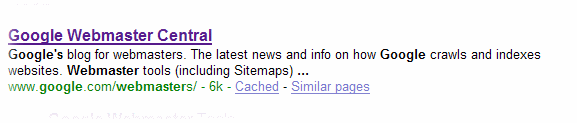
This simple tip for visitors helps search engines too. Search engines index pages based on the words contained in them, and including descriptive titles helps search engines know what the pages are about. And search engines often use a page's title in the search results. "Welcome to my site" may not entice searchers to click on your site in the results quite so much as "Buffy's House of Sofas".
Write with words
Images, flash, and other multimedia make for pretty web pages, but make sure your core messages are in text or use ALT text to provide textual descriptions of your multimedia. This is great for search engines, which are based on text: searchers enter search queries as word, after all. But it's also great for visitors, who may have images or Flash turned off in their browsers or might be using screen readers or mobile devices. You can also provide HTML versions of your multimedia-based pages (if you do that, be sure to block the multimedia versions from being indexed using a robots.txt file).

Make sure the text you're talking about is in your content
Visitors may not read your web site linearly like they would a newspaper article or book. Visitors may follow links from elsewhere on the web to any of your pages. Make sure that they have context for any page they're on. On your order page, don't just write "order now!" Write something like "Order your fluffy red sofa now!" But write it for people who will be reading your site. Don't try to cram as many words in as possible, thinking search engines can index more words that way. Think of your visitors. What are they going to be searching for? Is your site full of industry jargon when they'll be searching for you with more informal words?

As I wrote in that guest post on Matt Cutts' blog when I talked about hyphens and underscores:

You know what your site’s about, so it may seem completely obvious to you when you look at your home page. But ask someone else to take a look and don’t tell them anything about the site. What do they think your site is about?

Consider this text:

“We have hundreds of workshops and classes available. You can choose the workshop that is right for you. Spend an hour or a week in our relaxing facility.”

Will this site show up for searches for [cooking classes] or [wine tasting workshops] or even [classes in Seattle]? It may not be as obvious to visitors (and search engine bots) what your page is about as you think.

Along those same lines, does your content use words that people are searching for? Does your site text say “check out our homes for sale” when people are searching for [real estate in Boston]?

Make sure your pages are accessible
I know -- this post was supposed to be about writing content, not technical details. But visitors can't read your site if they can't access it. If the network is down or your server returns errors when someone tries to access the pages of your site, it's not just search engines who will have trouble. Fortunately, webmaster tools makes it easy. We'll let you know if we've had any trouble accessing any of the pages. We tell you the specific page we couldn't access and the exact error we got. These problems aren't always easy to fix, but we try to make them easy to find.

Indexing apps just like websites

Webmaster Level: Advanced

Searchers on smartphones experience many speed bumps that can slow them down. For example, any time they need to change context from a web page to an app, or vice versa, users are likely to encounter redirects, pop-up dialogs, and extra swipes and taps. Wouldn't it be cool if you could give your users the choice of viewing your content either on the website or via your app, both straight from Google's search results?
Today, we’re happy to announce a new capability of Google Search, called app indexing, that uses the expertise of webmasters to help create a seamless user experience across websites and mobile apps.
Just like it crawls and indexes websites, Googlebot can now index content in your Android app. Webmasters will be able to indicate which app content you'd like Google to index in the same way you do for webpages today — through your existing Sitemap file and through Webmaster Tools. If both the webpage and the app contents are successfully indexed, Google will then try to show deep links to your app straight in our search results when we think they’re relevant for the user’s query and if the user has the app installed. When users tap on these deep links, your app will launch and take them directly to the content they need. Here’s an example of a search for home listings in Mountain View:


We’re currently testing app indexing with an initial group of developers. Deep links for these applications will start to appear in Google search results for signed-in users on Android in the US in a few weeks. If you are interested in enabling indexing for your Android app, it’s easy to get started:
  1. Let us know that you’re interested. We’re working hard to bring this functionality to more websites and apps in the near future.
  2. Enable deep linking within your app.
  3. Provide information about alternate app URIs, either in the Sitemaps file or in a link element in pages of your site.
For more details on implementation and for information on how to sign up, visit our developer site. As always, if you have any questions, please ask in the mobile section of our webmaster forum.


Friday, 30 October 2015

Easier recovery for hacked sites

Webmaster Level: All

We know that as a site owner, discovering your site is hacked with spam or malware is stressful, and trying to clean it up under a time constraint can be very challenging. We’ve been working to make recovery even easier and streamline the cleaning process — we notify webmasters when the software they’re running on their site is out of date, and we’ve set up a dedicated help portal for hacked sites with detailed articles explaining each step of the process to recovery, including videos.
Today, we’re happy to introduce a new feature in Webmaster Tools called Security Issues.
As a verified site owner, you’ll be able to:
  • Find more information about the security issues on your site, in one place.
  • Pinpoint the problem faster with detailed code snippets.
  • Request review for all issues in one go through the new simpified process.

Find more information about the security issues on your site, in one place
Now, when we’ve detected your site may have been hacked with spam or with malware, we’ll show you everything in the same place for easy reference. Information that was previously available in the Malware section of Webmaster Tools, as well as new information about spam inserted by hackers, is now available in Security Issues. On the Security Issues main page, you’ll see the type of hacking, sample URLs if available, and the date when we last detected the issue.


Pinpoint the problem faster with detailed code snippets
Whenever possible, we’ll try to show you HTML and JavaScript code snippets from the hacked URLs and list recommended actions to help you clean up the specific type of hacking we’ve identified.


Request review for all issues in one go
We’ve also simplified requesting a review. Once you’ve cleaned your site and closed the security holes, you can request a review for all issues with one click of a button straight from the Security Issues page.


If you need more help, our updated and expanded help for hacked sites portal is now available in 22 languages. Let us know what you think in the comments here or at the Webmaster Help Forum.


Sunday, 25 October 2015

Website clinic: Call for submissions

Webmaster Level: Beginner

Cross-posted on the Google Grants Blog

Googlers often participate in live site clinics at conferences, giving advice about real-world sites and allowing webmasters to learn by example. Now Google’s Search Quality team is excited to host an online site clinic right here on this blog. In future posts, we’ll be looking at some user-submitted examples and offering broad advice that you can apply to your site.

This site clinic will focus on non-profit organizations, but chances are that our advice will benefit small business and government sites as well. If you work for a non-profit and would like us to consider your site, read on for submission instructions.

How to Submit Your Site:
To register your site for our clinic, fill in the information requested on our form. From there, we will determine trends and share corresponding best practices to improve site quality and user experience. Our analysis will be available in a follow-up post, and will adhere to public standards of webmaster guidance. Please note that by submitting your site, you permit us to use your site as an example in our follow-up site clinic posts.

We have a few guidelines:
  1. Your site must belong to an officially registered non-profit organization.
  2. In order to ensure that you’re the site owner, you must verify ownership of your site in Google Webmaster Tools. You can do that (for free) here.
  3. To the best of your ability, make sure your site meets our webmaster quality guidelines. We will be using the same principles as a basis for our analysis.
All set? Submit your site for consideration here.

The site clinic goes live today, and submissions will be accepted until Monday, November 8, 2010. Stay tuned for some useful webmaster tips when we review the sites.

Update to our webmaster guidelines

As the web continues to change and evolve, our algorithms change right along with it. Recently, as a result of one of those algorithmic changes, we've modified our webmaster guidelines. Previously, these stated:


Don't use "&id=" as a parameter in your URLs, as we don't include these pages in our index.

However, we've recently removed that technical guideline, and now index URLs that contain that parameter. So if your site uses a dynamic structure that generates it, don't worry about rewriting it -- we'll accept it just fine as is. Keep in mind, however, that dynamic URLs with a large number of parameters may be problematic for search engine crawlers in general, so rewriting dynamic URLs into user-friendly versions is always a good practice when that option is available to you. If you can, keeping the number of URL parameters to one or two may make it more likely that search engines will crawl your dynamic urls.

Tuesday, 20 October 2015

Optimizing sites for TV

Webmaster Level: All

Just as mobile phones make your site accessible to people on the go, Google TV makes your site easily viewable to people lounging on their couch. Google TV is a platform that combines your current TV programming with the web and, before long, more apps. It’s the web you love, with the TV you love, all available on the sofa made for you. Woohoo!

Because Google TV has a fully functioning web browser built in, users can easily visit your site from their TV. Current sites should already work, but you may want to provide your users with an enhanced TV experience -- what's called the “10-foot UI” (user interface). They'll be several feet away from the screen, not several inches away, and rather than a mouse on their desktop, they'll have a remote with a keyboard and a pointing device.

For example, here’s YouTube for desktop users versus what we’re calling “YouTube Leanback” -- our site optimized for large screens:


YouTube desktop version on the left, YouTube Leanback on the right

See our Spotlight Gallery for more examples of TV-optimized sites.

What does "optimized for TV" mean?

It means that, for the user sitting on their couch, your site on their TV is an even more enjoyable experience:
  • Text is large enough to be viewable from the sofa-to-TV distance.
  • Site navigation can be performed through button arrows on the remote (a D-pad), rather than mouse/touchpad usage
  • Selectable elements provide a visual queue when selected (when you’re 10 feet away, it needs to be really, really obvious what selections are highlighted)
  • and more...
How can webmasters gain a general idea of their site’s appearance on TV?

First, remember that appearance alone doesn't incorporate whether your site can be easily navigated by TV users (i.e. users with a remote rather than a mouse). With that said, here’s a quick workaround to give you a ballpark idea of how your site looks on TV. (For more in-depth info, please see the “Design considerations” in our optimization guide.)
  1. On a large monitor, make your window size 1920 x 1080.
  2. In a browser, visit your site at full screen.
  3. Zoom the browser to 1.5x the normal size. This is performed in different ways with different keyboards. For example, in Chrome if you press ctrl+ (press ctrl and + at the same time) twice, that’ll zoom the browser to nearly 1.5x the initial size.
  4. Move back 3 x (the distance between you and the monitor).
  5. Check out your site!
And don’t forget, if you want to see your site with the real thing, Google TV enabled devices are now available in stores.

How can you learn more?

Our team just published a developer site, with TV optimization techniques, at code.google.com/tv/web/.

Monday, 19 October 2015

Googlebot activity reports

The webmaster tools team has a very exciting mission: we dig into our logs, find as much useful information as possible, and pass it on to you, the webmasters. Our reward is that you more easily understand what Google sees, and why some pages don't make it to the index.

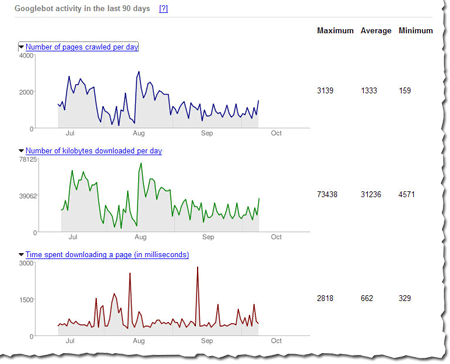
The latest batch of information that we've put together for you is the amount of traffic between Google and a given site. We show you the number of requests, number of kilobytes (yes, yes, I know that tech-savvy webmasters can usually dig this out, but our new charts make it really easy to see at a glance), and the average document download time. You can see this information in chart form, as well as in hard numbers (the maximum, minimum, and average).

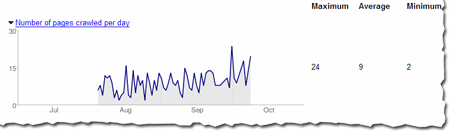
For instance, here's the number of pages Googlebot has crawled in the Webmaster Central blog over the last 90 days. The maximum number of pages Googlebot has crawled in one day is 24 and the minimum is 2. That makes sense, because the blog was launched less than 90 days ago, and the chart shows that the number of pages crawled per day has increased over time. The number of pages crawled is sometimes more than the total number of pages in the site -- especially if the same page can be accessed via several URLs. So http://googlewebmastercentral.blogspot.com/2006/10/learn-more-about-googlebots-crawl-of.html and http://googlewebmastercentral.blogspot.com/2006/10/learn-more-about-googlebots-crawl-of.html#links are different, but point to the same page (the second points to an anchor within the page).


And here's the average number of kilobytes downloaded from this blog each day. As you can see, as the site has grown over the last two and a half months, the number of average kilobytes downloaded has increased as well.


The first two reports can help you diagnose the impact that changes in your site may have on its coverage. If you overhaul your site and dramatically reduce the number of pages, you'll likely notice a drop in the number of pages that Googlebot accesses.

The average document download time can help pinpoint subtle networking problems. If the average time spikes, you might have network slowdowns or bottlenecks that you should investigate. Here's the report for this blog that shows that we did have a short spike in early September (the maximum time was 1057 ms), but it quickly went back to a normal level, so things now look OK.

In general, the load time of a page doesn't affect its ranking, but we wanted to give this info because it can help you spot problems. We hope you will find this data as useful as we do!

Sunday, 18 October 2015

Introducing Code Search Sitemaps


Update: Code Search Sitemaps are no longer supported. More information.


The Sitemaps team is continuing its trend of extending the Sitemap Protocol for specific products and content types. Our latest work with the Google Code Search team now enables you to create Sitemaps that contain information about public source code you host and would like to include in Code Search. There's more information about this new functionality on the Google Code blog. If you're eager to get going, take a look at our Help Center documentation, create a Code Search Sitemap, sign into Google Webmaster Tools, and submit a Sitemap for Code Search!

Webmasters can now provide feedback on Sitelinks


Sitelinks are extra links that appear below some search results in Google. They serve as shortcuts to help users quickly navigate to the important pages on your site.

Selecting pages to appear as sitelinks is a completely automated process. Our algorithms parse the structure and content of websites and identify pages that provide fast navigation and relevant information for the user's query. Since our algorithms consider several factors to generate sitelinks, not all websites have them.

Now, Webmaster Tools lets you view potential sitelinks for your site and block the ones you don't want to appear in Google search results. Because sitelinks are extremely useful in helping users navigate your site, we don't typically recommend blocking them. However, occasionally you might want to exclude a page from your sitelinks, for example: a page that has become outdated or unavailable, or a page that contains information you don't want emphasized to users. Once you block a page, it won't appear as a sitelink for 90 days unless you choose to unblock it sooner. It may take a week or so to remove a page from your sitelinks, but we are working on making this process faster.

To view and manage your sitelinks, go to the Webmaster Tools Dashboard and click the site you want. In the left menu click Links, then click Sitelinks.
Thanks for your feedback and stay tuned for more updates!


Update: the user-interface for this feature has changed. For more information, please see the Sitelinks Help Center article.

Saturday, 17 October 2015

Learn more about Googlebot's crawl of your site and more!

We've added a few new features to webmaster tools and invite you to check them out.

Googlebot activity reports
Check out these cool charts! We show you the number of pages Googlebot's crawled from your site per day, the number of kilobytes of data Googlebot's downloaded per day, and the average time it took Googlebot to download pages. Webmaster tools show each of these for the last 90 days. Stay tuned for more information about this data and how you can use it to pinpoint issues with your site.

Crawl rate control
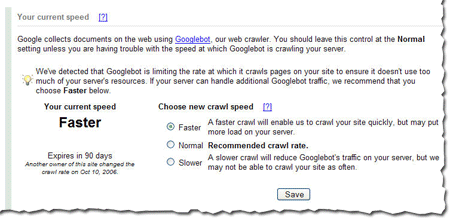
Googlebot uses sophisticated algorithms that determine how much to crawl each site. Our goal is to crawl as many pages from your site as we can on each visit without overwhelming your server's bandwidth.

We've been conducting a limited test of a new feature that enables you to provide us information about how we crawl your site. Today, we're making this tool available to everyone. You can access this tool from the Diagnostic tab. If you'd like Googlebot to slow down the crawl of your site, simply choose the Slower option.

If we feel your server could handle the additional bandwidth, and we can crawl your site more, we'll let you know and offer the option for a faster crawl.

If you request a changed crawl rate, this change will last for 90 days. If you liked the changed rate, you can simply return to webmaster tools and make the change again.


Enhanced image search
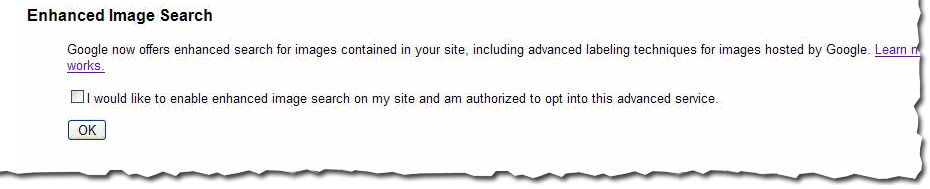
You can now opt into enhanced image search for the images on your site, which enables our tools such as Google Image Labeler to associate the images included in your site with labels that will improve indexing and search quality of those images. After you've opted in, you can opt out at any time.

Number of URLs submitted
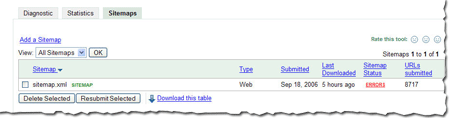
Recently at SES San Jose, a webmaster asked me if we could show the number of URLs we find in a Sitemap. He said that he generates his Sitemaps automatically and he'd like confirmation that the number he thinks he generated is the same number we received. We thought this was a great idea. Simply access the Sitemaps tab to see the number of URLs we found in each Sitemap you've submitted.

As always, we hope you find these updates useful and look forward to hearing what you think.

Friday, 16 October 2015

A new tool to disavow links

Webmaster level: Advanced

Today we’re introducing a tool that enables you to disavow links to your site. If you’ve been notified of a manual spam action based on “unnatural links” pointing to your site, this tool can help you address the issue. If you haven’t gotten this notification, this tool generally isn’t something you need to worry about.

First, a quick refresher. Links are one of the most well-known signals we use to order search results. By looking at the links between pages, we can get a sense of which pages are reputable and important, and thus more likely to be relevant to our users. This is the basis of PageRank, which is one of more than 200 signals we rely on to determine rankings. Since PageRank is so well-known, it’s also a target for spammers, and we fight linkspam constantly with algorithms and by taking manual action.

If you’ve ever been caught up in linkspam, you may have seen a message in Webmaster Tools about “unnatural links” pointing to your site. We send you this message when we see evidence of paid links, link exchanges, or other link schemes that violate our quality guidelines. If you get this message, we recommend that you remove from the web as many spammy or low-quality links to your site as possible. This is the best approach because it addresses the problem at the root. By removing the bad links directly, you’re helping to prevent Google (and other search engines) from taking action again in the future. You’re also helping to protect your site’s image, since people will no longer find spammy links pointing to your site on the web and jump to conclusions about your website or business.

If you’ve done as much as you can to remove the problematic links, and there are still some links you just can’t seem to get down, that’s a good time to visit our new Disavow links page. When you arrive, you’ll first select your site.


You’ll then be prompted to upload a file containing the links you want to disavow.


The format is straightforward. All you need is a plain text file with one URL per line. An excerpt of a valid file might look like the following:

# Contacted owner of spamdomain1.com on 7/1/2012 to

# ask for link removal but got no response

domain:spamdomain1.com
# Owner of spamdomain2.com removed most links, but missed these
http://www.spamdomain2.com/contentA.html
http://www.spamdomain2.com/contentB.html
http://www.spamdomain2.com/contentC.html

In this example, lines that begin with a pound sign (#) are considered comments and Google ignores them. The “domain:” keyword indicates that you’d like to disavow links from all pages on a particular site (in this case, “spamdomain1.com”). You can also request to disavow links on specific pages (in this case, three individual pages on spamdomain2.com). We currently support one disavowal file per site and the file is shared among site owners in Webmaster Tools. If you want to update the file, you’ll need to download the existing file, modify it, and upload the new one. The file size limit is 2MB.

One great place to start looking for bad links is the “Links to Your Site” feature in Webmaster Tools. From the homepage, select the site you want, navigate to Traffic > Links to Your Site > Who links the most > More, then click one of the download buttons. This file lists pages that link to your site. If you click “Download latest links,” you’ll see dates as well. This can be a great place to start your investigation, but be sure you don’t upload the entire list of links to your site -- you don’t want to disavow all your links!

To learn more about the feature, check out our Help Center, and we’d welcome your comments and questions in our forum. You’ll also find a video about the tool and a quick Q&A below.


Tuesday, 13 October 2015

Webmaster Tools - Links to your site updated

Webmaster Level: All

The "Links to your site" feature in Webmaster Tools is now updated to show you which domains link the most to your site, in addition to other improvements. On the overview page you'll notice that there are three main sections: the domains linking most to your site, the pages on your site with the most links, and a sampling of the anchor text external sites are using when they link to your site.


Who links the most
Clicking the “More »” link under the “Who links the most” section will take you to a new view that shows a listing of all the domains that link to your site. Each domain in the list can be expanded to display a sample of pages from your site which are linked to by that domain.


The "More »" link under each specific domain lists all the pages linked to by that domain. At the top of the page there's a total count of links from that domain and a total count of your site's pages linked to from that domain.


Your most linked content
If you drill into the “Your most linked content” view from the overview page, you’ll see a listing of all your site’s most important linked pages. There's also a link count for each page as well as a count of domains linking to that page. Clicking any of the pages listed will expand the view to show you examples of the leading domains linking to that page and the number of links to the given page from each domain listed. The data used for link counts and throughout the "Links to your site" feature is more comprehensive now, including links redirected using 301 or 302 HTTP redirects.


Each page listed in the "All linked pages" view has an associated "More »" link which displays all the domains linking to that specific page on your site.


Each domain listed leads to a report of all the pages from that domain linking to your specific page.


We hope the updated “Links to your site” feature in Webmaster Tools will help you better understand where the links to your site are coming from and improve your ability to track changes to your site’s link profile. Please post any comments you have about this updated feature or post your questions in the Webmaster Help Forum. We appreciate your feedback since it helps us to continue to improve the functionality of Webmaster Tools.

Sunday, 11 October 2015

Got a website? Get gadgets.

Google Gadgets are miniature-sized devices that offer cool and dynamic content -- they can be games, news clips, weather reports, maps, or most anything you can dream up. They've been around for a while, but their reach got a lot broader last week when we made it possible for anyone to add gadgets to their own webpages. Here's an example of a flight status tracker, for instance, that can be placed on any page on the web for free.

Anyone can search for gadgets to add to their own webpage for free in our directory of gadgets for your webpage. To put a gadget on your page, just pick the gadget you like, set your preferences, and copy-and-paste the HTML that is generated for you onto your own page.

Creating gadgets for others isn't hard, either, and it can be a great way to get your content in front of people while they're visiting Google or other sites. Here are a few suggestions for distributing your own content on the Google homepage or other pages across the web:

* Create a Google Gadget for distribution across the web. Gadgets can be most anything, from simple HTML to complex applications. It’s easy to experiment with gadgets – anyone with even a little bit of web design experience can make a simple one (even me!), and more advanced programmers can create really snazzy, complex ones. But remember, it’s also quick and easy for people to delete gadgets or add new ones too their own pages. To help you make sure your gadget will be popular across the web, we provide a few guidelines you can use to create gadgets. The more often folks find your content to be useful, the longer they'll keep your gadget on their pages, and the more often they’ll visit your site.

* If your website has a feed, visitors can put snippets of your content on their own Google homepages quickly and easily, and you don't even need to develop a gadget. However, you will be able to customize their experience much more fully with a gadget than with a feed.

* By putting the “Add to Google” button in a prominent spot on your site, you can increase the reach of your content, because visitors who click to add your gadget or feed to Google can see your content each time they visit the Google homepage. Promoting your own gadget or feed can also increase its popularity, which contributes to a higher ranking in the directory of gadgets for the Google personalized homepage.

Saturday, 10 October 2015

Make the web faster with mod_pagespeed, now out of Beta


If your page is on the web, speed matters. For developers and webmasters, making your page faster shouldn’t be a hassle, which is why we introduced mod_pagespeed in 2010. Since then the development team has been working to improve the functionality, quality and performance of this open-source Apache module that automatically optimizes web pages and their resources. Now, after almost two years and eighteen releases, we are announcing that we are taking off the Beta label.

We’re committed to working with the open-source community to continue evolving mod_pagespeed, including more, better and smarter optimizations and support for other web servers. Over 120,000 sites are already using mod_pagespeed to improve the performance of their web pages using the latest techniques and trends in optimization. The product is used worldwide by individual sites, and is also offered by hosting providers, such as DreamHost, Go Daddy and content delivery networks like EdgeCast. With the move out of beta we hope that even more sites will soon benefit from the web performance improvements offered through mod_pagespeed.

mod_pagespeed is a key part of our goal to help make the web faster for everyone. Users prefer faster sites and we have seen that faster pages lead to higher user engagement, conversions, and retention. In fact, page speed is one of the signals in search ranking and ad quality scores. Besides evangelizing for speed, we offer tools and technologies to help measure, quantify, and improve performance, such as Site Speed Reports in Google Analytics, PageSpeed Insights, and PageSpeed Optimization products. In fact, both mod_pagespeed and PageSpeed Service are based on our open-source PageSpeed Optimization Libraries project, and are important ways in which we help websites take advantage of the latest performance best practices.


To learn more about mod_pagespeed and how to incorporate it in your site, watch our recent Google Developers Live session or visit the mod_pagespeed product page.


Friday, 9 October 2015

Multiple Sitemaps in the same directory

We've gotten a few questions about whether you can put multiple Sitemaps in the same directory. Yes, you can!

You might want to have multiple Sitemap files in a single directory for a number of reasons. For instance, if you have an auction site, you might want to have a daily Sitemap with new auction offers and a weekly Sitemap with less time-sensitive URLs. Or you could generate a new Sitemap every day with new offers, so that the list of Sitemaps grows over time. Either of these solutions works just fine.

Or, here's another sample scenario: Suppose you're a provider that supports multiple web shops, and they share a similar URL structure differentiated by a parameter. For example:

http://example.com/stores/home?id=1
http://example.com/stores/home?id=2
http://example.com/stores/home?id=3

Since they're all in the same directory, it's fine by our rules to put the URLs for all of the stores into a single Sitemap, under http://example.com/ or http://example.com/stores/. However, some webmasters may prefer to have separate Sitemaps for each store, such as:

http://example.com/stores/store1_sitemap.xml
http://example.com/stores/store2_sitemap.xml
http://example.com/stores/store3_sitemap.xml

As long as all URLs listed in the Sitemap are at the same location as the Sitemap or in a sub directory (in the above example http://example.com/stores/ or perhaps http://example.com/stores/catalog) it's fine for multiple Sitemaps to live in the same directory (as many as you want!). The important thing is that Sitemaps not contain URLs from parent directories or completely different directories -- if that happens, we can't be sure that the submitter controls the URL's directory, so we can't trust the metadata.

The above Sitemaps could also be collected into a single Sitemap index file and easily be submitted via Google webmaster tools. For example, you could create http://example.com/stores/sitemap_index.xml as follows:

<?xml version="1.0" encoding="UTF-8"?>
<sitemapindex xmlns="http://www.google.com/schemas/sitemap/0.84">
<sitemap>
<loc>http://example.com/stores/store1_sitemap.xml</loc>
<lastmod>2015-10-01T18:23:17+00:00</lastmod>
</sitemap>
<sitemap>
<loc>http://example.com/stores/store2_sitemap.xml</loc>
<lastmod>2015-10-01</lastmod>
</sitemap>
<sitemap>
<loc>http://example.com/stores/store3_sitemap.xml</loc>
<lastmod>2015-10-05</lastmod>
</sitemap>
</sitemapindex>

Then simply add the index file to your account, and you'll be able to see any errors for each of the child Sitemaps.

If each store includes more than 50,000 URLs (the maximum number for a single Sitemap), you would need to have multiple Sitemaps for each store. In that case, you may want to create a Sitemap index file for each store that lists the Sitemaps for that store. For instance:

http://example.com/stores/store1_sitemapindex.xml
http://example.com/stores/store2_sitemapindex.xml
http://example.com/stores/store3_sitemapindex.xml

Since Sitemap index files can't contain other index files, you would need to submit each Sitemap index file to your account separately.

Whether you list all URLs in a single Sitemap or in multiple Sitemaps (in the same directory of different directories) is simply based on what's easiest for you to maintain. We treat the URLs equally for each of these methods of organization.

Thursday, 8 October 2015

Webmaster Tools: Updates to Search queries, Parameter handling and Messages

Webmaster level: All

We've just released updates to several features in Webmaster Tools to provide you with more detail and more control of how your site appears in search results.

Search queries: Time does not stand still and neither should your site. With that in mind we've added a "Change" column next to the impressions, clicks, clickthrough rate (CTR) and position columns, making it easier to identify trends for each of these important metrics. The change column is tied to the date range you specify, which should help when you're trying to pinpoint when a particular change occurred.


Each query listed in Search queries now links to a query details page which includes a graph of impressions and clicks for that specific query, providing a quick visual of its performance in the search results over time. Below the graph is a table listing of the pages returned in search results for that query, along with impressions, clicks and CTR. Each column in the table is sortable, offering a quick way to re-sort the data based on what's most interesting to you. If you'd rather use your own favorite tool to slice and dice the data you can use the "Download this table" link to export all the information from the main Search queries page or from each individual query details page.


Better Parameter Handling: We've moved this feature under its own tab in the Settings section of Webmaster Tools, and introduced a new action to manage parameters. When we introduced Parameter Handling last year, we allowed you to specify URL parameters and whether they should be ignored or not. When you choose to ignore a parameter, you are telling us that this parameter has no impact on the displayed content. For example, consider a session id parameter, like “sid” in the following URLs:

http://example.com/product.php?item=swedish-fish
http://example.com/product.php?item=swedish-fish&sid=1234
http://example.com/product.php?item=swedish-fish&sid=5678

Assuming that these three URLs display exactly the same product page for tasty Swedish fish candy, Google only needs to crawl and index one of them. You can simply select action “Ignore” for parameter “sid” in Webmaster Tools and Google will just crawl and index one of these URLs, avoiding duplicates.

In addition to the old functionality, you now have the ability to choose a specific value among the known values for a given URL parameter. This is important when a parameter is relevant to the content, but different values of this parameter lead to similar pages. For example, consider a sorting parameter, like “sort-by” in the following URLs:

http://example.com/shop.php?category=candy&sort-by=asc-price&page=1
http://example.com/shop.php?category=candy&sort-by=desc-price&page=1
http://example.com/shop.php?category=candy&sort-by=asc-price&page=2
http://example.com/shop.php?category=candy&sort-by=desc-price&page=2

These four URLs show products in the candy category. There are enough items in this category to fill two pages, and the products shown can be sorted by price, in ascending or descending order. Selecting action “Ignore” for parameter “sort-by” would be incorrect and could potentially limit our indexing of the site. This is because, after ignoring “sort-by”, we would consider the first two URLs equivalent and may choose to index the URL with ascending sort order. We would also consider the last two URLs equivalent and may choose to index the URL with descending sort order. In this scenario, we would be indexing the candy category inconsistently, with some candy products appearing in both of the pages selected for the index, while other candy products not appearing in either of them. The right solution comes from the new action “Use specific value” now available in Webmaster Tools. To avoid duplicates but still keep our indexing consistent, you can simply select action “Use specific value” for parameter “sort-by” and choose one of the valid values, say “asc-price”. After this, our indexing would be fully consistent, as we would focus only on the pages with products sorted by ascending price.


Messages: Some sites receive lots of messages in the Webmaster Tools Message Center. With this update we've added the ability to "star" specific messages that you deem important. There's now a separate "Starred" view where you can see all the messages that you’ve starred, making tracking and finding the most important messages for your site a breeze.


We hope these updates make Webmaster Tools even more useful for your site. Please post a comment if you have feedback on any of these updates; or if you have questions, post them in our Webmaster Help Forum.

Data freshness


Common feedback we hear from webmasters is that you want us to improve the freshness of the data in Webmaster Tools. Understood. :) We've increased the update frequency for your verified sites' data, such as crawl, index, and search query stats. Much of this data depends on the content of your site. If your content doesn't change very often, or if you're not getting new links to your site, you may not see updates to your data every time you sign in to Webmaster Tools.

Please continue to post your Suggestions & feature requests in the Webmaster Help Group. It's one of our most important sources of feedback from the webmaster community. We seriously take it seriously.

Saturday, 3 October 2015

Rich snippets guidelines

Webmaster level: All


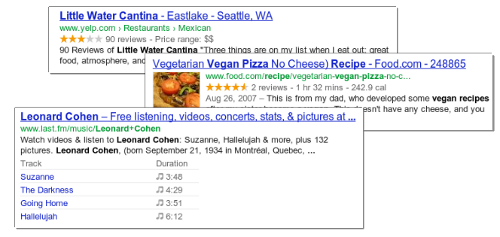
Traditional, text-only, search result snippets aim to summarize the content of a page in our search results. Rich snippets (shown above) allow webmasters to help us provide even better summaries using structured data markup that they can add to their pages. Today we're introducing a set of guidelines to help you implement high quality structured data markup for rich snippets.

Once you've correctly added structured data markup to you site, rich snippets are generated algorithmically based on that markup. If the markup on a page offers an accurate description of the page's content, is up-to-date, and is visible and easily discoverable on your page and by users, our algorithms are more likely to decide to show a rich snippet in Google’s search results.

Alternatively, if the rich snippets markup on a page is spammy, misleading, or otherwise abusive, our algorithms are much more likely to ignore the markup and render a text-only snippet. Keep in mind that, while rich snippets are generated algorithmically, we do reserve the right to take manual action (e.g., disable rich snippets for a specific site) in cases where we see actions that hurt the experience for our users.

To illustrate these guidelines with some examples:
  • If your page is about a band, make sure you mark up concerts being performed by that band, not by related bands or bands in the same town.
  • If you sell products through your site, make sure reviews on each page are about that page's product and not the store itself.
  • If your site provides song lyrics, make sure reviews are about the quality of the lyrics, not the quality of the song itself.
In addition to the general rich snippets quality guidelines we're publishing today, you'll find usage guidelines for specific types of rich snippets in our Help Center. As always, if you have any questions or feedback, please tell us in the Webmaster Help Forum.

Friday, 2 October 2015

Google Webmaster Guidelines updated

Webmaster level: All

Today we’re happy to announce an updated version of our Webmaster Quality Guidelines. Both our basic quality guidelines and many of our more specific articles (like those on links schemes or hidden text) have been reorganized and expanded to provide you with more information about how to create quality websites for both users and Google.

The main message of our quality guidelines hasn’t changed: Focus on the user. However, we’ve added more guidance and examples of behavior that you should avoid in order to keep your site in good standing with Google’s search results. We’ve also added a set of quality and technical guidelines for rich snippets, as structured markup is becoming increasingly popular.

We hope these updated guidelines will give you a better understanding of how to create and maintain Google-friendly websites.

Thursday, 1 October 2015

Keeping you informed of critical website issues

Webmaster level: All

Having a healthy and well-performing website is important, both to you as the webmaster and to your users. When we discover critical issues with a website, Webmaster Tools will now let you know by automatically sending an email with more information.

We’ll only notify you about issues that we think have significant impact on your site’s health or search performance and which have clear actions that you can take to address the issue. For example, we’ll email you if we detect malware on your site or see a significant increase in errors while crawling your site.

For most sites these kinds of issues will occur rarely. If your site does happen to have an issue, we cap the number of emails we send over a certain period of time to avoid flooding your inbox.  If you don’t want to receive any email from Webmaster Tools you can change your email delivery preferences.

We hope that you find this change a useful way to stay up-to-date on critical and important issues regarding your site’s health. If you have any questions, please let us know via our Webmaster Help Forum.