Wednesday, 28 January 2015

Request visitors' permission before installing software

(Cross-posted on the Google Korea Blog)

Webmaster Level: All

Legitimate websites may require that their visitors install software. These sites often do so to provide their users with additional functionality beyond what's available in standard web browsers, like viewing a special type of document. Please note, however, that if your site requires specific software for your visitors, the implementation of this software installation process is very important. Incorrect implementation can appear as though you're installing malware, triggering our malware detection filters, and resulting in your site being labeled with a 'This site may harm your computer' malware warning in our search results.

If using your site requires a special software install, you need to first inform visitors why they need to install additional software. Here are two bad examples and one good example of how to handle the situation of a new visitor to such a site:

Bad: Install the required software without giving the visitor a chance to choose whether or not they want to install the software.

Bad: Pop up a confirmation dialog box that prompts the visitor to agree to install the software, without providing enough detail for the visitor to make an informed choice. (This includes the standard ActiveX control installation dialog box, since it doesn't contain enough meaningful information for a visitor to make an informed decision about that particular piece of software.)

Good: Redirect the new visitor to an information page which provides thorough details on why a special software installation is required to use the site. From this page the visitor can initiate the installation of the required software if they decide to proceed with installation.

Has your site been labeled with a malware warning in our search results due to a poorly implemented software installation requirement? Updating the installation process to ensure that visitors are fully informed on why the installation is necessary, and giving them a chance to opt out, should resolve this issue. Once you've got this in place, you can go to Webmaster Tools and request a malware review to expedite the process of removing any malware warnings associated with your site in Google's search results.

Tuesday, 27 January 2015

Breaking news for G11i Pro and HD7 Pro owners!!!

For those that weren't following the respective G11i Pro or HD7 Pro support threads, here are the breaking news:
Both phones can now support one of the most desired features - SIM2 will be reachable even if there's an active data connection established on SIM1. The data connection will be immediately dropped when a new call is incoming from SIM2 and the download will be automatically resumed after the call is over.


In my opinion, that's the most important feature of the newly released ROMs. Although, there are many more changes / improvements... such as battery consumption reduction, better memory management, speed improvements, many bug fixes and, of course, some cosmetics changes. Here are just a few eye candies.


For the most distracted ones, here are the links to the support threads:


Enjoy!!!

Monday, 26 January 2015

More Options for Google+ Badges

Webmaster Level: All

Update on February 2, 2012: The new Google+ badge is now out of preview and available to all users on all sites.

When we launched Google+ pages in November, we also released Google+ badges to promote your Google+ presence right on your site. Starting today in developer preview (and soon available to all your users), we're adding more options for integrating the Google+ badge into your website. You can configure a badge with a width that fits your site design and choose a version that works better on darker sites. You'll also see that Google+ badges now include the unified +1 and circle count that we added to Pages last month.


If you’re still considering whether to add a Google+ badge on your website, consider this: We recently looked at top sites using the badge and found that, on average, the badge accounted for an additional 38% of followers. When you add the badge visitors to your website can discover your Google+ page and connect in a variety of ways: they can follow your Google+ page, +1 your site, share your site with their circles, see which of their friends have +1’d your site, and click through to visit your Google+ page.

The Google+ Badge makes it easy for your fans to find and follow you on Google+. With these additional options, we hope it's even easier to create a badge that fits your website.

Follow the conversation on Google+.

What’s new with Sitemaps

Webmaster level: All

Sitemaps are a way to tell Google about pages on your site. Webmaster Tools’ Sitemaps feature gives you feedback on your submitted Sitemaps, such as how many Sitemap URLs have been indexed, or whether your Sitemaps have any errors. Recently, we’ve added even more information! Let’s check it out:


The Sitemaps page displays details based on content-type. Now statistics from Web, Videos, Images and News are featured prominently. This lets you see how many items of each type were submitted (if any), and for some content types, we also show how many items have been indexed. With these enhancements, the new Sitemaps page replaces the Video Sitemaps Labs feature, which will be retired.

Another improvement is the ability to test a Sitemap. Unlike an actual submission, testing does not submit your Sitemap to Google as it only checks it for errors. Testing requires a live fetch by Googlebot and usually takes a few seconds to complete. Note that the initial testing is not exhaustive and may not detect all issues; for example, errors that can only be identified once the URLs are downloaded are not be caught by the test.

In addition to on-the-spot testing, we’ve got a new way of displaying errors which better exposes what types of issues a Sitemap contains. Instead of repeating the same kind of error many times for one Sitemap, errors and warnings are now grouped, and a few examples are given. Likewise, for Sitemap index files, we’ve aggregated errors and warnings from the child Sitemaps that the Sitemap index encloses. No longer will you need to click through each child Sitemap one by one.

Finally, we’ve changed the way the “Delete” button works. Now, it removes the Sitemap from Webmaster Tools, both from your account and the accounts of the other owners of the site. Be aware that a Sitemap may still be read or processed by Google even if you delete it from Webmaster Tools. For example if you reference a Sitemap in your robots.txt file search engines may still attempt to process the Sitemap. To truly prevent a Sitemap from being processed, remove the file from your server or block it via robots.txt.

For more information on Sitemaps in Webmaster Tools and how Sitemaps work, visit our Help Center. If you have any questions, go to Webmaster Help Forum.

Protect your site from spammers with reCAPTCHA

Webmaster Level: All

If you allow users to publish content on your website, from leaving comments to creating user profiles, you’ll likely see spammers attempt to take advantage of these mechanisms to generate traffic to their own sites. Having this spammy content on your site isn't fun for anyone. Users may be subjected to annoying advertisements directing them to low-quality or dangerous sites containing scams or malware. And you as a webmaster may be hosting content that violates a search engine's quality guidelines, which can harm your site's standing in search results.

There are ways to handle this abuse, such as moderating comments and reviewing new user accounts, but there is often so much spam created that it can become impossible to keep up with. Spam can easily get to this unmanageable level because most spam isn’t created manually by a human spammer. Instead, spammers use computer programs called “bots” to automatically fill out web forms to create spam, and these bots can generate spam much faster than a human can review it.

To level the playing field, you can take steps to make sure that only humans can interact with potentially spammable features of your website. One way to determine which of your visitors are human is by using a CAPTCHA , which stands for "completely automated public Turing test to tell computers and humans apart." A typical CAPTCHA contains an image of distorted letters which humans can read, but are not easily understood by computers. Here's an example:


You can easily take advantage of this technology on your own site by using reCAPTCHA, a free service owned by Google. One unique aspect of reCAPTCHA is that data collected from the service is used to improve the process of scanning text, such as from books or newspapers. By using reCAPTCHA, you're not only protecting your site from spammers; you're helping to digitize the world's books.

Luis Von Ahn, one reCAPTCHA's co-founders, gives more details about how the service works in the video below:


If you’d like to implement reCAPTCHA for free on your own site, you can sign up here. Plugins are available for easy installation on popular applications and programming environments such as WordPress and PHP.

Sunday, 25 January 2015

A quick word about Googlebombs

Co-written with Ryan Moulton and Kendra Carattini

We wanted to give a quick update about "Googlebombs." By improving our analysis of the link structure of the web, Google has begun minimizing the impact of many Googlebombs. Now we will typically return commentary, discussions, and articles about the Googlebombs instead. The actual scale of this change is pretty small (there are under a hundred well-known Googlebombs), but if you'd like to get more details about this topic, read on.

First off, let's back up and give some background. Unless you read all about search engines all day, you might wonder "What is a Googlebomb?" Technically, a "Googlebomb" (sometimes called a "linkbomb" since they're not specific to Google) refers to a prank where people attempt to cause someone else's site to rank for an obscure or meaningless query. Googlebombs very rarely happen for common queries, because the lack of any relevant results for that phrase is part of why a Googlebomb can work. One of the earliest Googlebombs was for the phrase "talentless hack," for example.

People have asked about how we feel about Googlebombs, and we have talked about them in the past. Because these pranks are normally for phrases that are well off the beaten path, they haven't been a very high priority for us. But over time, we've seen more people assume that they are Google's opinion, or that Google has hand-coded the results for these Googlebombed queries. That's not true, and it seemed like it was worth trying to correct that misperception. So a few of us who work here got together and came up with an algorithm that minimizes the impact of many Googlebombs.

The next natural question to ask is "Why doesn't Google just edit these search results by hand?" To answer that, you need to know a little bit about how Google works. When we're faced with a bad search result or a relevance problem, our first instinct is to look for an automatic way to solve the problem instead of trying to fix a particular search by hand. Algorithms are great because they scale well: computers can process lots of data very fast, and robust algorithms often work well in many different languages. That's what we did in this case, and the extra effort to find a good algorithm helps detect Googlebombs in many different languages. We wouldn't claim that this change handles every prank that someone has attempted. But if you are aware of other potential Googlebombs, we are happy to hear feedback in our Google Web Search Help Group.

Again, the impact of this new algorithm is very limited in scope and impact, but we hope that the affected queries are more relevant for searchers.

Update to Top Search Queries data

Webmaster level: All

Starting today, we’re updating our Top Search Queries feature to make it better match expectations about search engine rankings. Previously we reported the average position of all URLs from your site for a given query. As of today, we’ll instead average only the top position that a URL from your site appeared in.

An example
Let’s say Nick searched for [bacon] and URLs from your site appeared in positions 3, 6, and 12. Jane also searched for [bacon] and URLs from your site appeared in positions 5 and 9. Previously, we would have averaged all these positions together and shown an Average Position of 7. Going forward, we’ll only average the highest position your site appeared in for each search (3 for Nick’s search and 5 for Jane’s search), for an Average Position of 4.

We anticipate that this new method of calculation will more accurately match your expectations about how a link's position in Google Search results should be reported.

How will this affect my Top Search Queries data?
This change will affect your Top Search Queries data going forward. Historical data will not change. Note that the change in calculation means that the Average Position metric will usually stay the same or decrease, as we will no longer be averaging in lower-ranking URLs.

Check out the updated Top Search Queries data in the Your site on the web section of Webmaster Tools. And remember, you can also download Top Search Queries data programmatically!

We look forward to providing you a more representative picture of your Google Search data. Let us know what you think in our Webmaster Forum.

Making form-filling faster, easier and smarter

Webmaster Level: Intermediate

One of the biggest bottlenecks on any conversion funnel is filling out an online form – shopping and registration flows all rely on forms as a crucial and demanding step in accomplishing the goals of your site. For many users, online forms mean repeatedly typing common information like our names and addresses on different sites across the web – a tedious task that causes many to give up and abandon the flow entirely.

Chrome’s Autofill and other form-filling providers help to break down this barrier by remembering common profile information and pre-populating the form with those values. Unfortunately, up to now it has been difficult for webmasters to ensure that Chrome and other form-filling providers can parse their form correctly. Some standards exist; but they put onerous burdens on the implementation of the website, so they’re not used much in practice.

Today we’re pleased to announce support in Chrome for an experimental new “autocomplete type” attribute for form fields that allows web developers to unambiguously label text and select fields with common data types such as ‘full-name’ or ‘street-address’. With this attribute, web developers can drive conversions on their sites by marking their forms for auto-completion without changing the user interface or the backend.


Just add an attribute to the input element, for example an email address field might look like:

<input type=”text” name=”field1” x-autocompletetype=”email” />

We’ve been working on this design in collaboration with several other autofill vendors. Like any early stage proposal we expect this will change and evolve as the web standards community provides feedback, but we believe this will serve as a good starting point for the discussion on how to best support autofillable forms in the HTML5 spec. For now, this new attribute is implemented in Chrome as x-autocompletetype to indicate that this is still experimental and not yet a standard, similar to the webkitspeech attribute we released last summer.

For more information, you can read the full text of the proposed specification, ask questions on the Webmaster help forum, or you can share your feedback in the standardization discussion!

Saturday, 24 January 2015

About badware warnings

Some of you have asked about the warnings we show searchers when they click on search results leading to sites that distribute malicious software. As a webmaster, you may be concerned about the possibility of your site being flagged. We want to assure you that we take your concerns very seriously, and that we are very careful to avoid flagging sites incorrectly. It's our goal to avoid sending people to sites that would compromise their computers. These exploits often result in real people losing real money. Compromised bank accounts and stolen credit card numbers are just the tip of this identity theft iceberg.

If your site has been flagged for badware, we let you know this in webmaster tools. Often, we find that webmasters aren't aware that their sites have been compromised, and this warning in search results is a surprise. Fixing a compromised site can be quite hard. Simply cleaning up the HTML files is seldom sufficient. If a rootkit has been installed, for instance, nothing short of wiping the machine and starting over may work. Even then, if the underlying security hole isn't also fixed, they may be compromised again within minutes.

We are looking at ways to provide additional information to webmasters whose sites have been flagged, while balancing our need to keep malicious site owners from hiding from Google's badware protection. We aim to be responsive to any misidentified sites too. If your site has been flagged, you'll see information on the appeals process in webmaster tools. If you can't find anything malicious on your site and believe it was misidentified, go to http://stopbadware.org/home/review to request an evaluation. If you'd like to discuss this with us or have ideas for how we can better communicate with you about it, please post in our webmaster discussion forum.

Update: this post has been updated to provide a link to the new form for requesting a review.


Update: for more information, please see our Help Center article on malware and hacked sites.

Friday, 23 January 2015

A faster image search

Webmaster level: all

People looking for images on Google often want to browse through many images, looking both at the images and their metadata (detailed information about the images). Based on feedback from both users and webmasters, we redesigned Google Images to provide a better search experience. In the next few days, you’ll see image results displayed in an inline panel so it’s faster, more beautiful, and more reliable. You will be able to quickly flip through a set of images by using the keyboard. If you want to go back to browsing other search results, just scroll down and pick up right where you left off.

Screenshot of new Google Images results using the query nasa earth as an example


Here’s what it means for webmasters:
  • We now display detailed information about the image (the metadata) right underneath the image in the search results, instead of redirecting users to a separate landing page.
  • We’re featuring some key information much more prominently next to the image: the title of the page hosting the image, the domain name it comes from, and the image size.
  • The domain name is now clickable, and we also added a new button to visit the page the image is hosted on. This means that there are now four clickable targets to the source page instead of just two. In our tests, we’ve seen a net increase in the average click-through rate to the hosting website.
  • The source page will no longer load up in an iframe in the background of the image detail view. This speeds up the experience for users, reduces the load on the source website’s servers, and improves the accuracy of webmaster metrics such as pageviews. As usual, image search query data is available in Top Search Queries in Webmaster Tools.
As always, please ask on our Webmaster Help forum if you have questions.

Thursday, 22 January 2015

Introducing a new Rich Snippets format: Events

Webmaster Level: All

Last year we introduced Rich Snippets, a new feature that makes it possible to surface structured data from your pages on Google's search results. So far, user reaction to Rich Snippets has been enthusiastic -- after all, Rich Snippets help people make more informed clicks and find what they need even faster.

We originally introduced Rich Snippets with two formats: reviews and people. Later in the year we added support for marking up video information which is used to improve Video Search. Today, we're excited to kick off the new year by adding support for events.

Events markup is based off of the hCalendar microformat. Here's an example of what the new events Rich Snippets will look like:


The new format shows links to specific events on the page along with dates and locations. It provides a fast and convenient way for users to determine if a page has events they may be interested in.

If you have event listings on your site, we encourage you to review the events documentation we've prepared to help you get started. Please note, however, that marking up your content is not a guarantee that Rich Snippets will show for your site. Just as we did for previous formats, we will take a gradual approach to incorporating the new event snippets to ensure a great user experience along the way.

Stay tuned for more developments in Rich Snippets throughout the year!

Wednesday, 21 January 2015

Google SEO resources for beginners

Webmaster Level: Beginner

Want to eat healthier and exercise more in 2010? That's tough! Want to learn about search engine optimization (SEO) so you can disregard the rumors and know what's important? That's easy! Here's how to gain SEO knowledge as you go about your new start to 2010:

Step 1: Absorb the basics
  • If you like to learn by reading, download our SEO Starter Guide for reading while you're on an exercise bike, training for Ironman.
  • Or, if you're more a video watcher, try listening to my "Search Friendly Development" session while you're cleaning your house. Keep in mind that some parts of the presentation are a little more technical.

  • For good measure, and because at some point you'll hear references to them, check out our webmaster guidelines for yourself.

Step 2: Explore details that pique your interest
Are you done with the basics but now you have some questions? Good for you! Try researching a particular topic in our Webmaster Help Center. For example, do you want more information about crawling and indexing or understanding what links are all about?


Step 3: Verify ownership of your site in Webmaster Tools
It takes a little bit of skill, but we have tons of help for verification. Once you verify ownership of your site (i.e., signal to Google that you're the owner), you can:


A sample message regarding the crawlability of your site


Step 4: Research before you do anything drastic
Usually the basics (e.g., good content/service and a crawlable site with indexable information) are the necessities for SEO. You may hear or read differently, but before you do anything drastic on your site such as robots.txt disallow'ing all of your directories or revamping your entire site architecture, please try:

Tuesday, 20 January 2015

State of the Index 2009

Webmaster Level: All

At PubCon in Las Vegas in November 2009, I gave a "State of the Index" talk which covers what Google has done for users, web developers, and webmasters in the last year. I recently recreated it on video for those of you who didn't make it to the conference. You can watch it below:


And here are the slides if you'd like to follow along:


Monday, 19 January 2015

Page layout algorithm improvement

Webmaster Level: All

In our ongoing effort to help you find more high-quality websites in search results, today we’re launching an algorithmic change that looks at the layout of a webpage and the amount of content you see on the page once you click on a result.

As we’ve mentioned previously, we’ve heard complaints from users that if they click on a result and it’s difficult to find the actual content, they aren’t happy with the experience. Rather than scrolling down the page past a slew of ads, users want to see content right away. So sites that don’t have much content “above-the-fold” can be affected by this change. If you click on a website and the part of the website you see first either doesn’t have a lot of visible content above-the-fold or dedicates a large fraction of the site’s initial screen real estate to ads, that’s not a very good user experience. Such sites may not rank as highly going forward.

We understand that placing ads above-the-fold is quite common for many websites; these ads often perform well and help publishers monetize online content. This algorithmic change does not affect sites who place ads above-the-fold to a normal degree, but affects sites that go much further to load the top of the page with ads to an excessive degree or that make it hard to find the actual original content on the page. This new algorithmic improvement tends to impact sites where there is only a small amount of visible content above-the-fold or relevant content is persistently pushed down by large blocks of ads.

This algorithmic change noticeably affects less than 1% of searches globally. That means that in less than one in 100 searches, a typical user might notice a reordering of results on the search page. If you believe that your website has been affected by the page layout algorithm change, consider how your web pages use the area above-the-fold and whether the content on the page is obscured or otherwise hard for users to discern quickly. You can use our Browser Size tool, among many others, to see how your website would look under different screen resolutions.

If you decide to update your page layout, the page layout algorithm will automatically reflect the changes as we re-crawl and process enough pages from your site to assess the changes. How long that takes will depend on several factors, including the number of pages on your site and how efficiently Googlebot can crawl the content. On a typical website, it can take several weeks for Googlebot to crawl and process enough pages to reflect layout changes on the site.

Overall, our advice for publishers continues to be to focus on delivering the best possible user experience on your websites and not to focus on specific algorithm tweaks. This change is just one of the over 500 improvements we expect to roll out to search this year. As always, please post your feedback and questions in our Webmaster Help forum.

Test your webmaster know-how!

Webmaster Level: All

We thought it might be fun and educational to create a quiz for webmasters about issues we commonly see in the Webmaster Help Forum. Together with our awesome Bionic Posters, we've tried to come up with questions and answers that reflect recurring concerns in the forum and some information that may not be well known. Some things to keep in mind when taking this quiz:
  • The quiz will be available to take from today until Wednesday, January 27 at 5PM PST.
  • It doesn't cover all facets of webmaster problems that arise, and—as with any test—it is at best only a fun way to test your webmaster prowess ;). We leave discussion of specific cases to the forum.
  • We've set up the quiz using our very own Google Docs. This means you won't see results right away, but we plan to write a follow-up blog post explaining answers and listing top scorers. Be sure to save your answers or print out your completed quiz before submitting! This way you can check your answers against the correct ones when we publish them.
  • It's just for fun!

The Year in Review

Welcome to 2007! The webmaster central team is very excited about our plans for this year, but we thought we'd take a moment to reflect on 2006. We had a great year building communication with you, the webmaster community, and creating tools based on your feedback. Many on the team were able to come out to conferences and met some of you in person, and we're looking forward to meeting many more of you in 2007. We've also had great conversations and gotten valuable feedback in our discussion forum, and we hope this blog has been helpful in providing information to you.

We said goodbye to the Sitemaps blog and launched this broader blog in August. And after doing so, our number of unique monthly visitors more than doubled. Thanks! We got much of our non-Google traffic from other webmaster community blogs and forums, such as the Search Engine Watch blog, Google Blogoscoped, and WebmasterWorld. In December, seomoz.org and the new Searchengineland.com were our biggest non-Google referrers. And social networking sites such as digg.com, reddit,com, del.icio.us, and slashdot.org sent webmaster tools many of our visitors, and a blog by somebody named Matt Cutts sent a lot of referrers our way as well. And these are the top Google queries that visitors clicked on:
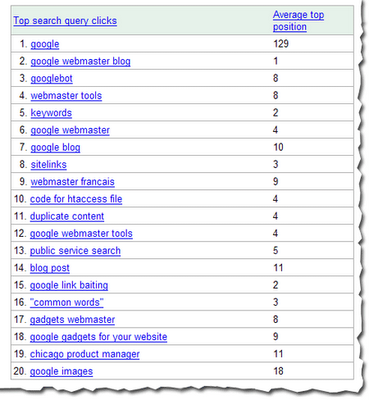

Our most popular post was about the Googlebot activity reports and crawl rate control that we launched in October, followed by details about how to authenticate Googlebot. We have only slightly more Firefox users (46.28%) than Internet Explorer users (46.25%). 89% of you use Windows. After English, our readers most commonly speak French, German, Japanese, and Spanish. And after the United States, our readers primarily come from the UK, Canada, Germany, and France.

Here's some of what we did last year.

January
We expanded into Swedish, Danish, Norwegian, and Finnish.
You could hear Matt on webmaster radio.

February
We lauched several new features, including:
  • robots.txt analysis tool
  • page with the highest PageRank by month
  • common words in your site's content and in anchor text to your site
We met many of you at the Google Sitemaps lunch at SES NY.
You could hear me on webmaster radio.

March
We launched a few more features, including:
  • showing the top position of your site for your top queries
  • top mobile queries
  • download options for Sitemaps data, stats, and errors

April
We got a whole new look and added yet more features, such as:
  • meta tag verification
  • notification of violations to the webmaster guidelines
  • reinclusion request form and spam reporting form
  • indexing information (can we crawl your home page? is your site indexed?)
We also added a comprehensive webmaster help center and expanded the webmaster guidelines from 10 languages to 18.
We met more of you at the Google Sitemaps lunch at Boston Pubcon.
Matt talked about the new caching proxy.
We talked to many of you at SES Toronto.

May
Matt introduced you to our new search evangelist, Adam Lasnik.
We hung out with some of you in our hometown at Search Engine Watch Live Seattle and over at SES London.

June

We launched user surveys, to learn more about how you interact with webmaster tools.
We expanded some of our features, such as:
  • increased the number of crawl errors shown to 100% within the last two weeks
  • Increased the number of Sitemaps you can submit from 200 to 500
  • Expanded query stats so you can see them per property and per country and made them available for subdirectories
  • Increased the number of common words in your site and in links to your site from 20 to 75
  • Added Adsbot-Google to the robots.txt analysis tool
Yahoo! Stores incorporated Sitemaps for their merchants.

July
We expanded into Polish.
We began supporting the <meta name="robots" content="noodpt"> tag to allow you to opt out of using Open Directory titles and descriptions for your site in the search results.
We had a great time talking to many of you about international issues at SES Latino in Miami.

August
August was an exciting month for us, as we launched webmaster central! As part of that, we renamed Google Sitemaps to webmaster tools, expanded our Google Group to include all types of webmaster topics, and expanded the help content in our webmaster help center. We also launched some new features, including:
  • Preferred domain control
  • Site verification management
  • Downloads of query stats for all subfolders
In addition, I took over the GoodKarma podcast on webmasterradio for two shows (one all about Buffy the Vampire Slayer!) and we met even more of you at the Google Webmaster Central lunch at SES San Jose.

September
We improved reporting of the cache date in search results.
We provided a way for you to authenticate Googlebot.
And we started updating query stats more often and for a shorter timeframe.

October
We launched several new features, such as:
  • Crawl rate control
  • Googlebot activity reports
  • Opting in to enhanced image search
  • Display of the number of URLs submitted via a Sitemap
And you could hear Matt being interviewed in a podcast.

November
We launched sitemaps.org, for joint support of the Sitemaps protocol between us, Yahoo!, and Microsoft.
We also started notifying you if we flagged your site for badware and if you're an English news publisher included in Google News, we made News Sitemaps available to you.
Partied with lots of you at "Safe Bets with Google" at Pubcon Las Vegas.
We introduced you to our new Sitemaps support engineer, Maile Ohye, and our first webmaster trends analyst, Jonathan Simon.

Dec
We met even more of you at the webmaster central lunch at SES Chicago.

Thanks for spending the year with us. We look forward to even more collaboration and communication in the coming year.

Saturday, 17 January 2015

MediaTek working on MT6575...


It seems that MediaTek has been working on a new chipset - MT6575 - as a response against Qualcomm's MSM7227A. It's said that it will feature a single core ARM Cortex™-A9 processor clocked at up to 1 GHz and will also support HSPA+. By comparison, MT6573 is much inferior, because the used chip integrates an ARM11™ processor clocked at only 650 MHz. On the modem part, MT6573 chipset only supports data connections up to HSPA (speed of 7.2 Mbps / 5.76 Mbps).

It's expected that the first MT6575 based smartphone prototypes start appearing after the upcoming Chinese New Year. Let's wait then!

Thursday, 15 January 2015

Upcoming Events In The Knowledge Graph

Webmaster level: all

Last year, we launched a new way for musical artists to list their upcoming events on Google: schema.org markup on their official websites. Now we’re expanding this program in four ways:

1. Official Ticket Links

For artists: if you mark up ticketing links along with the events on your official website, we’ll show an expanded answer card for your events in Google search, including the on-sale date, availability, and a direct link to your preferred ticketing site.
As before, you may write the event markup directly into your site’s HTML, or simply install an event widget that builds in the markup for you automatically—like Bandsintown, BandPage, GigPress, ReverbNation or Songkick.

2. Delegated Event Listings

What if you can’t add markup or an event widget to your official website—for example, if your website doesn’t list your events at all? Now you can use delegation markup to tell us to source your events from a page of your choice on another website. Just add the following markup to your home page, making sure to customize the three red values:
<script type="application/ld+json">
{"@context" : "http://schema.org",
"@type" : "MusicGroup",
"name" : "Your Band or Performer Name",
"url" : "http://your-official-website.com",
"event" : "http://other-event-site.com/your-event-listing-page/"
}
</script>
The marked-up events found on the other event site's page will then be eligible for Google events features. Examples of sites you can point to in the “event” field include bandpage.com, bandsintown.com, songkick.com, and ticketmaster.com.

3. Comedian Events

Hey funny people! We want your performances to show up on Google, too. Just add ComedyEvent markup to your official website. Or, if another site like laughstub.com has your complete event listings, use delegation markup on your home page to point us their way.

4. Venue Events

Last but definitely not least: we’re starting to show venue event listings in Google Search. Concert venues, theaters, libraries, fairgrounds, and so on: make your upcoming events eligible for display across Google by adding Event markup to your official website.
As with artist events, you have a choice of writing the event markup directly into your site’s HTML, or using a widget or plugin that builds in the markup for you. Also, if all your events are ticketed by a primary ticketer whose website provides markup, you don’t have to do anything! Google will read the ticketer’s markup and apply it toward your venue’s event listings.

For example, venues ticketed by Ticketmaster, including its international sites and TicketWeb, will automatically be covered. The same goes for venues that list events with Ticketfly, AXS, LaughStub, Wantickets, Holdmyticket, ShowClix, Stranger Tickets, Ticket Alternative, Digitick, See Tickets, Tix, Fnac Spectacles, Ticketland.ru, iTickets, MIDWESTIX, Ticketleap, or Instantseats. All of these have already implemented ticketer events markup.

Please see our Developer Site for full documentation of these features, including a video tutorial on how to write and test event markup. Then add the markup, help new fans discover your events, and play to a packed house!

New Structured Data Testing Tool, documentation, and more

Webmaster level: all

Structured data markup helps your content get discovered in search results and across Google properties. We’re excited to share several updates to help you author and publish markup on your website:

Structured Data Testing Tool

The new Structured Data Testing Tool better reflects how Google interprets a web page’s structured data markup.
It provides the following features:
  • Validation for all Google features powered by structured data
  • Support for markup in the JSON-LD syntax, including in dynamic HTML pages
  • Clean display of the structured data items on your page
  • Syntax highlighting of markup problems right in your HTML source code

New documentation and simpler policy

We've clarified our documentation for the vocabulary supported in structured data based on webmasters' feedback. The new documentation explains the markup you need to add to enable different search features for your content, along with code examples in the supported syntaxes. We'll be retiring the old documentation soon.

We've also simplified and clarified our policies on using structured data. If you believe that another site is abusing Google's rich snippets quality guidelines, please let us know using the rich snippets spam report form.

Expanded support for JSON-LD

We've extended our support for schema.org vocabulary in JSON-LD syntax to new use cases: company logos and contacts, social profile links, events in the Knowledge Graph, the sitelinks search box, and event rich snippets. We're working on expanding support to additional markup-powered features in the future.

As always, we welcome your feedback and questions; please post in our Webmaster Help forums.

Wednesday, 14 January 2015

Answering your December Grab Bag questions

Webmaster Level: All

You asked and Matt Cutts answered. It's time to answer the latest round of Grab Bag questions! Here's the first answer, complete with Matt's new hairstyle:


We have a lot of videos ready to share, so we're not currently taking new questions for the Grab Bag. If you have a question that you would like answered, your best bet as always is to head to our Webmaster Help Forum, where you'll find plenty of knowledgeable webmasters, including some Bionic Posters!

To be kept up-to-date on our latest video releases, you can follow @googlewmc on Twitter, where we'll announce new videos and blog posts as they're published.

Monday, 12 January 2015

Better page titles in search results

Page titles are an important part of our search results: they’re the first line of each result and they’re the actual links our searchers click to reach websites. Our advice to webmasters has always been to write unique, descriptive page titles (and meta descriptions for the snippets) to describe to searchers what the page is about.
We use many signals to decide which title to show to users, primarily the <title> tag if the webmaster specified one. But for some pages, a single title might not be the best one to show for all queries, and so we have algorithms that generate alternative titles to make it easier for our users to recognize relevant pages. Our testing has shown that these alternative titles are generally more relevant to the query and can substantially improve the clickthrough rate to the result, helping both our searchers and webmasters. About half of the time, this is the reason we show an alternative title.
Other times, alternative titles are displayed for pages that have no title or a non-descriptive title specified by the webmaster in the HTML. For example, a title using simply the word "Home" is not really indicative of what the page is about. Another common issue we see is when a webmaster uses the same title on almost all of a website’s pages, sometimes exactly duplicating it and sometimes using only minor variations. Lastly, we also try to replace unnecessarily long or hard-to-read titles with more concise and descriptive alternatives.
For more information about how you can write better titles and meta descriptions, and to learn more about the signals we use to generate alternative titles, we've recently updated the Help Center article on this topic. Also, we try to notify webmasters when we discover titles that can be improved on their websites through the HTML Suggestions feature in Webmaster Tools; you can find this feature in the Diagnostics section of the menu on the left hand side.
As always, if you have any questions or feedback, please tell us in the Webmaster Help Forum.