Thursday, 30 April 2015

Responsive design – harnessing the power of media queries

Webmaster Level: Intermediate / Advanced

We love data, and spend a lot of time monitoring the analytics on our websites. Any web developer doing the same will have noticed the increase in traffic from mobile devices of late. Over the past year we’ve seen many key sites garner a significant percentage of pageviews from smartphones and tablets. These represent large numbers of visitors, with sophisticated browsers which support the latest HTML, CSS, and JavaScript, but which also have limited screen space with widths as narrow as 320 pixels.

Our commitment to accessibility means we strive to provide a good browsing experience for all our users. We faced a stark choice between creating mobile specific websites, or adapting existing sites and new launches to render well on both desktop and mobile. Creating two sites would allow us to better target specific hardware, but maintaining a single shared site preserves a canonical URL, avoiding any complicated redirects, and simplifies the sharing of web addresses. With a mind towards maintainability we leant towards using the same pages for both, and started thinking about how we could fulfill the following guidelines:
  1. Our pages should render legibly at any screen resolution
  2. We mark up one set of content, making it viewable on any device
  3. We should never show a horizontal scrollbar, whatever the window size


Stacked content, tweaked navigation and rescaled images – Chromebooks
Implementation

As a starting point, simple, semantic markup gives us pages which are more flexible and easier to reflow if the layout needs to be changed. By ensuring the stylesheet enables a liquid layout, we're already on the road to mobile-friendliness. Instead of specifying width for container elements, we started using max-width instead. In place of height we used min-height, so larger fonts or multi-line text don’t break the container’s boundaries. To prevent fixed width images “propping open” liquid columns, we apply the following CSS rule:

img {
max-width: 100%;
}


Liquid layout is a good start, but can lack a certain finesse. Thankfully media queries are now well-supported in modern browsers including IE9+ and most mobile devices. These can make the difference between a site that degrades well on a mobile browser, vs. one that is enhanced to take advantage of the streamlined UI. But first we have to take into account how smartphones represent themselves to web servers.

Viewports

When is a pixel not a pixel? When it’s on a smartphone. By default, smartphone browsers pretend to be high-resolution desktop browsers, and lay out a page as if you were viewing it on a desktop monitor. This is why you get a tiny-text “overview mode” that’s impossible to read before zooming in. The default viewport width for the default Android browser is 800px, and 980px for iOS, regardless of the number of actual physical pixels on the screen.

In order to trigger the browser to render your page at a more readable scale, you need to use the viewport meta element:

<meta name="viewport" content="width=device-width, initial-scale=1">


Mobile screen resolutions vary widely, but most modern smartphone browsers currently report a standard device-width in the region of 320px. If your mobile device actually has a width of 640 physical pixels, then a 320px wide image would be sized to the full width of the screen, using double the number of pixels in the process. This is also the reason why text looks so much crisper on the small screen – double the pixel density as compared to a standard desktop monitor.

The useful thing about setting the width to device-width in the viewport meta tag is that it updates when the user changes the orientation of their smartphone or tablet. Combining this with media queries allows you to tweak the layout as the user rotates their device:

@media screen and (min-width:480px) and (max-width:800px) {
  /* Target landscape smartphones, portrait tablets, narrow desktops

  */
}

@media screen and (max-width:479px) {
  /* Target portrait smartphones */
}


In reality you may find you need to use different breakpoints depending on how your site flows and looks on various devices. You can also use the orientation media query to target specific orientations without referencing pixel dimensions, where supported.


@media all and (orientation: landscape) {
  /* Target device in landscape mode */
}

@media all and (orientation: portrait) {
  /* Target device in portrait mode */
}


Stacked content, smaller images – Cultural Institute
A media queries example

We recently re-launched the About Google page. Apart from setting up a liquid layout, we added a few media queries to provide an improved experience on smaller screens, like those on a tablet or smartphone.

Instead of targeting specific device resolutions we went with a relatively broad set of breakpoints. For a screen resolution wider than 1024 pixels, we render the page as it was originally designed, according to our 12-column grid. Between 801px and 1024px, you get to see a slightly squished version thanks to the liquid layout.

Only if the screen resolution drops to 800 pixels will content that’s not considered core content be sent to the bottom of the page:


@media screen and (max-width: 800px) {
/* specific CSS */
}


With a final media query we enter smartphone territory:


@media screen and (max-width: 479px) {
/* specific CSS */
}


At this point, we’re not loading the large image anymore and we stack the content blocks. We also added additional whitespace between the content items so they are more easily identified as different sections.

With these simple measures we made sure the site is usable on a wide range of devices.


Stacked content and the removal of large image – About Google
Conclusion

It’s worth bearing in mind that there’s no simple solution to making sites accessible on mobile devices and narrow viewports. Liquid layouts are a great starting point, but some design compromises may need to be made. Media queries are a useful way of adding polish for many devices, but remember that 25% of visits are made from those desktop browsers that do not currently support the technique and there are some performance implications. And if you have a fancy widget on your site, it might work beautifully with a mouse, but not so great on a touch device where fine control is more difficult.

The key is to test early and test often. Any time spent surfing your own sites with a smartphone or tablet will prove invaluable. When you can’t test on real devices, use the Android SDK or iOS Simulator. Ask friends and colleagues to view your sites on their devices, and watch how they interact too.

Mobile browsers are a great source of new traffic, and learning how best to support them is an exciting new area of professional development.

Some more examples of responsive design at Google:


Sunday, 26 April 2015

Rich snippets go international

Webmaster Level: All

As part of our efforts to make search results more useful to our users around the world, we’re announcing the international availability of rich snippets. If you’ve been following our blog posts, you already know that rich snippets let users see additional facts and data from your site in search results.

For example, we recently launched rich snippets for recipes which, for certain sites, lets users see quick recipe facts as part of the snippet and makes it easier to determine if the page has what they are looking for:


We’ve had a lot of questions on our blogs and forums about international support for rich snippets - and we know that many of you have already started marking up your content - so today’s announcement is very exciting for us.

In addition to adding support for rich snippets in any language, we have published documentation on how to mark up your sites for rich snippets in the following languages: simplified Chinese, traditional Chinese, Czech, Dutch, English, French, German, Hungarian, Italian, Japanese, Korean, Polish, Portuguese, Russian, Spanish, and Turkish. (You can change the Help language by scrolling to the bottom of the help page and selecting the language you want from the drop-down menu.)

We encourage you to read the documentation to take advantage of the different types of rich snippets currently supported: people profiles, reviews, videos, events and recipes. You can also use our testing tool (in English only, but useful to test markup in any language) and start validating your markup to make sure results show as you would expect.

Finally and as you’ve probably heard by now (several times), we’re taking a gradual approach to surface rich snippets. This means that marking up your site doesn’t guarantee that we’ll show rich snippets for your pages. We’re doing this to ensure a good experience for our users; but rest assured we’re working hard to expand coverage and include more web pages.

Even more Top Search Queries data

Webmaster level: All We recently updated the Top Search Queries data to take into account the average top position, we enabled programmatic download and we made sure you could still get all the queries that drive traffic to your site. Well, now it’s time to give you more search queries data!

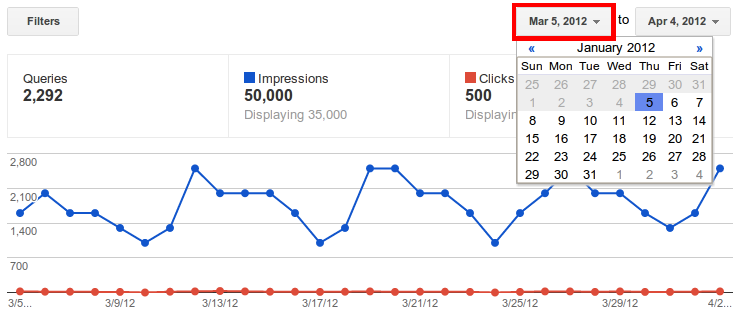
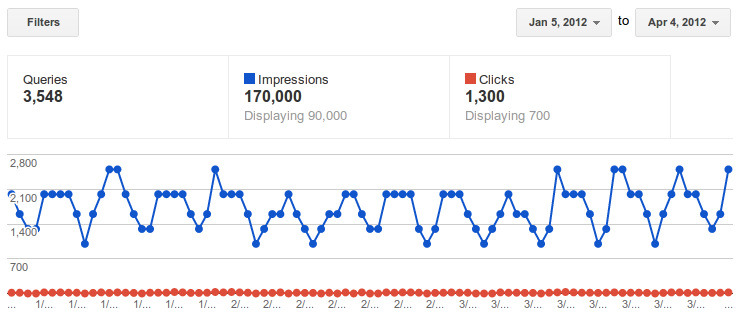
First, and most important, you can now see up to 90 days of historical data. If you click on the date picker in the top right of Search queries, you can go back three months instead of the previous 35 days.

And after you click:

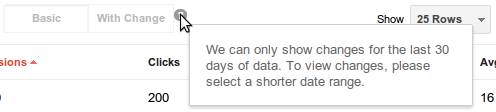
In order to see 90 days, the option to view with changes will be disabled. If you want to see the changes with respect to the previous time period, the limit remains 30 days. Changes are disabled by default but you can switch them on and off with the button between the graph and the table. Top search queries data is normally available within 2 or 3 days.

Another big improvement in Webmaster Tools is that you can now see basic search query data as soon as you verify ownership of a site. No more waiting to see your information.

Finally, we're now collecting data for the top 2000 queries for which your site gets clicks. You may see less than 2000 if we didn’t record any clicks for a particular query in a given day, or if your query data is spread out among many countries or languages. For example, a search for [flowers] on Google Canada is counted separately from a search for [flowers] on google.com. Nevertheless, with this change 98% of sites will have complete coverage. Let us know what you think. We hope the new data will be useful.

Saturday, 25 April 2015

Indexar o seu site

Após o registo de um domínio e criação de um site, a maioria dos webmasters quer ver o seu site indexado e aparecer nas primeiras posições no Google. Desde que iniciámos o suporte a webmasters de língua Portuguesa em 2006, vimos grande especulação acerca da forma como o Google indexa e avalia os sites. O mercado de língua Portuguesa, ainda numa fase de desenvolvimento em relação a SEO, é um dos maiores geradores de conteúdo na internet, por isso decidimos clarificar algumas das questões mais pertinentes.

Notámos como prática comum entre webmasters de língua Portuguesa a tendência para entrar em esquemas massivos de troca de links e a implementação de páginas única e exclusivamente para este fim, sem terem em consideração a qualidade dos links, a origem ou o impacto que estes terão nos seus sites a longo termo; outros temas populares englobam também uma preocupação excessiva com o PageRank ou a regularidade com que o Google acede aos seus sites.
Geralmente, o nosso conselho para quem pretende criar um site é começar por considerar aquilo que têm para oferecer antes de criar qualquer site ou blog. A receita para um site de sucesso é conteúdo original, onde os utilizadores possam encontrar informação de qualidade e actualizada correspondendo às suas necessidades.

Para clarificar alguns destes temas, compilámos algumas dicas para webmasters de língua Portuguesa:

  • Ser considerado autoridade no assunto. Ser experiente num tema guiará de forma natural ao seu site utilizadores que procuram informação especificamente relacionada com o assunto do site. Não se preocupe demasiado com back-links ou PageRank, ambos irão surgir de forma natural acompanhando a importância e relevância do seu site. Se os utilizadores considerarem a sua informação útil e de qualidade, eles voltarão a visitar, recomendarão o seu site a outros utilizadores e criarão links para o mesmo. Isto tem também influência na relevância do seu site para o Google – se é relevante para os utilizadores, certamente será relevante para o Google na mesma proporção.
  • Submeta o seu conteúdo no Google e mantenha-o actualizado frequentemente. Este é outro ponto chave que influencia a frequência com que o seu site é acedido pelo Google. Se o seu conteúdo não é actualizado ou se o seu site não é relevante, o mais certo é o Google não aceder ao seu site com a mesma frequência que você deseja. Se acha que o Google não acede ao seu site de uma forma constante, talvez isto seja uma dica para que actualize o site mais frequentemente. Além disso na Central do Webmaster o Google disponibiliza as Ferramentas para Webmasters, ferramentas úteis que o ajudarão na indexação.
  • Evite puras afiliações. Na América Latina há uma quantidade massiva de sites criados apenas para pura afiliação, tais como as lojas afiliadas do mercadolivre. Não há problema em ser afiliado desde que crie conteúdo original e de qualidade para os utilizadores, um bom exemplo é a inclusão de avaliação e críticas de produtos de forma a ajudar o utilizador na decisão da compra.
  • Não entre em esquemas de troca de links. Os esquemas de troca de links ou negócios que prometem aumentar a visibilidade do seu site com o mínimo de esforço, podem levar a um processo de correcção por parte do Google. As nossas Directrizes de Ajuda do Webmaster mencionam claramente esta prática na secção "Directrizes de Qualidade – princípios básicos". Evite entrar neste tipo de esquemas e não crie páginas apenas para troca de links. Tenha em mente que não é o número de links que apontam para o seu site que conta, mas a qualidade e relevância desses links.
  • Use o AdSense de forma correcta. Monetizar conteúdo original e de qualidade levará a uma melhor experiência com o AdSense comparado com directórios sem qualquer tipo de qualidade ou conteúdo original. Sites sem qualquer tipo de valor levam os utilizadores a abandoná-los antes mesmo de estes clicarem em qualquer anúncio.
    Lembre-se que o processo de indexação e de acesso ao seu site pelo Google engloba muitas variáveis e em muitos casos o seu site não aparecerá no índice tão depressa quanto esperava. Se não está seguro acerca de um problema particular, considere visitar as Directrizes de Ajuda do Webmaster ou peça ajuda na sua comunidade. Na maioria dos casos encontrará a resposta que procura de outros utilizadores mais experientes. Um dos sítios recomendados para começar é o Grupo de Discussão de Ajuda a Webmasters que monitorizamos regularmente.

Getting your site indexed

After registering a domain and creating a website, the next thing almost everybody wants is to get it indexed in Google and rank high. Since we started supporting webmasters in the Portuguese language market in 2006, we saw a growing speculation about how Google indexes and ranks websites. The Portuguese language market is one of the biggest web content generators and it's still in development regarding SEO, so we decided to shed some light into the main debated questions.

We have noticed that it is very popular among Portuguese webmasters to engage in massive link exchange schemes and to build partner pages exclusively for the sake of cross-linking, disregarding the quality of the links, the sources, and the long-term impact it will have on their sites; other popular issues involve an over-concern with PageRank and how often Google crawls their websites.

Generally, our advice is to consider what you have to offer, before you create your own website or blog. The recipe for a good and successful site is unique and original content where users find valuable and updated information corresponding to their needs.

To address some of these concerns, we have compiled some hints for Portuguese webmasters:

  • Be an authority on the subject. Being experienced in the subject you are writing about will naturally drive users to your site who search for that specific subject. Don't be too concerned about back-links and PageRank, both will grow naturally as your site becomes a reference. If users find your site useful and of good quality, they will most likely link to your site, return to it and/or recommend your site to other users. This has also an influence on how relevant your site will be to Google — if it's relevant for the users, than it's likely that it is relevant to Google as well.
  • Submit your content to Google and update it on a frequent basis. This is another key factor for the frequency with which your site will be crawled. If your content is not frequently updated or if your site is not relevant to the subject, most likely you will not be crawled as often as you would like to be. If you wonder why Google doesn't crawl your sites on a frequent or constant basis, then maybe this is a hint and you should look into updating your site more often. Apart from that in the Webmasters Central we offer Webmaster tools to help you get your site crawled.
  • Don't engage in link exchange schemes. Be aware that link exchange programs or deals that promise to boost your site visibility with a minimum effort might entail some corrective action from Google. Our Google Webmasters Guidelines clearly address this issue under "Quality Guidelines – basic principles". Avoid engaging in these kind of schemes and don't build pages specifically for exchanging links. Bear in mind that it is not the number of links you have pointing to your site that matters, but the quality and relevance of those links.
  • Avoid pure affiliations. In the Latin America market there is a massive number of sites created just for pure affiliation purposes such as pure mercadolivre catalogs. There is no problem in being an affiliate as long as you create some added value for your users and produce valuable content that a user can't find anywhere else like product reviews and ratings.
  • Use AdSense wisely. Monetizing original and valuable content will generate you more revenue from AdSense compared to directories with no added value. Be aware that sites without added value will turn away users from your site before they will ever click on an AdSense ad.

You should bear in mind that the process of indexing and how Google crawls your site includes many variables and in many cases your site won't come up as quickly in the SERPs as you expected. If you are not sure about some particular issue, consider visiting the Google Webmasters Guidelines or seek guidance in your community. In most cases you will get good advice and positive feedback from more experienced users. One of the recommended places to start is the Google discussion group for webmasters (in English) as well as the recently launched Portuguese discussion group for webmasters which we will monitor on a regular basis.

1000 Words About Images

Webmaster level: All

Creativity is an important aspect of our lives and can enrich nearly everything we do. Say I'd like to make my teammate a cup of cool-looking coffee, but my creative batteries are empty; this would be (and is!) one of the many times when I look for inspiration on Google Images.


The images you see in our search results come from publishers of all sizes — bloggers, media outlets, stock photo sites — who have embedded these images in their HTML pages. Google can index image types formatted as BMP, GIF, JPEG, PNG and WebP, as well as SVG.

But how does Google know that the images are about coffee and not about tea? When our algorithms index images, they look at the textual content on the page the image was found on to learn more about the image. We also look at the page's title and its body; we might also learn more from the image’s filename, anchor text that points to it, and its "alt text;" we may use computer vision to learn more about the image and may also use the caption provided in the Image Sitemap if that text also exists on the page.

 To help us index your images, make sure that:
  • we can crawl both the HTML page the image is embedded in, and the image itself;
  • the image is in one of our supported formats: BMP, GIF, JPEG, PNG, WebP or SVG.
Additionally, we recommend:
  • that the image filename is related to the image’s content;
  • that the alt attribute of the image describes the image in a human-friendly way;
  • and finally, it also helps if the HTML page’s textual contents as well as the text near the image are related to the image.
Now some answers to questions we’ve seen many times:

Q: Why do I sometimes see Googlebot crawling my images, rather than Googlebot-Image?
A: Generally this happens when it’s not clear that a URL will lead to an image, so we crawl the URL with Googlebot first. If we find the URL leads to an image, we’ll usually revisit with Googlebot-Image. Because of this, it’s generally a good idea to allow crawling of your images and pages by both Googlebot and Googlebot-Image.

Q: Is it true that there’s a maximum file size for the images?
A: We’re happy to index images of any size; there’s no file size restriction.

Q: What happens to the EXIF, XMP and other metadata my images contain?
A: We may use any information we find to help our users find what they’re looking for more easily. Additionally, information like EXIF data may be displayed in the right-hand sidebar of the interstitial page that appears when you click on an image.

Q: Should I really submit an Image Sitemap? What are the benefits?
A: Yes! Image Sitemaps help us learn about your new images and may also help us learn what the images are about.

Q: I’m using a CDN to host my images; how can I still use an Image Sitemap?
A: Cross-domain restrictions apply only to the Sitemaps’ tag. In Image Sitemaps, the tag is allowed to point to a URL on another domain, so using a CDN for your images is fine. We also encourage you to verify the CDN’s domain name in Webmaster Tools so that we can inform you of any crawl errors that we might find.

Q: Is it a problem if my images can be found on multiple domains or subdomains I own — for example, CDNs or related sites?
A: Generally, the best practice is to have only one copy of any type of content. If you’re duplicating your images across multiple hostnames, our algorithms may pick one copy as the canonical copy of the image, which may not be your preferred version. This can also lead to slower crawling and indexing of your images.

Q: We sometimes see the original source of an image ranked lower than other sources; why is this?
A: Keep in mind that we use the textual content of a page when determining the context of an image. For example, if the original source is a page from an image gallery that has very little text, it can happen that a page with more textual context is chosen to be shown in search. If you feel you've identified very bad search results for a particular query, feel free to use the feedback link below the search results or to share your example in our Webmaster Help Forum.

SafeSearch

Our algorithms use a great variety of signals to decide whether an image — or a whole page, if we’re talking about Web Search — should be filtered from the results when the user’s SafeSearch filter is turned on. In the case of images some of these signals are generated using computer vision, but the SafeSearch algorithms also look at simpler things such as where the image was used previously and the context in which the image was used.
One of the strongest signals, however, is self-marked adult pages. We recommend that webmasters who publish adult content mark up their pages with one of the following meta tags:
<meta name="rating" content="adult" />
<meta name="rating" content="RTA-5042-1996-1400-1577-RTA" />
Many users prefer not to have adult content included in their search results (especially if kids use the same computer). When a webmaster provides one of these meta tags, it helps to provide a better user experience because users don't see results which they don't want to or expect to see. 

As with all algorithms, sometimes it may happen that SafeSearch filters content inadvertently. If you think your images or pages are mistakenly being filtered by SafeSearch, please let us know using the following form

If you need more information about how we index images, please check out the section of our Help Center dedicated to images, read our SEO Starter Guide which contains lots of useful information, and if you have more questions please post them in the Webmaster Help Forum

Friday, 24 April 2015

How to move your content to a new location

Webmaster level: Intermediate

While maintaining a website, webmasters may decide to move the whole website or parts of it to a new location. For example, you might move content from a subdirectory to a subdomain, or to a completely new domain. Changing the location of your content can involve a bit of effort, but it’s worth doing it properly.

To help search engines understand your new site structure better and make your site more user-friendly, make sure to follow these guidelines:
  • It’s important to redirect all users and bots that visit your old content location to the new content location using 301 redirects. To highlight the relationship between the two locations, make sure that each old URL points to the new URL that hosts similar content. If you’re unable to use 301 redirects, you may want to consider using cross domain canonicals for search engines instead.
  • Check that you have both the new and the old location verified in the same Google Webmaster Tools account.
  • Make sure to check if the new location is crawlable by Googlebot using the Fetch as Googlebot feature. It’s important to make sure Google can actually access your content in the new location. Also make sure that the old URLs are not blocked by a robots.txt disallow directive, so that the redirect or rel=canonical can be found.
  • If you’re moving your content to an entirely new domain, use the Change of address option under Site configuration in Google Webmaster Tools to let us know about the change.

Change of address option in Google Webmaster Tools
Tell us about moving your content via Google Webmaster Tools
  • If you've also changed your site's URL structure, make sure that it's possible to navigate it without running into 404 error pages. Google Webmaster Tools may prove useful in investigating potentially broken links. Just look for Diagnostics > Crawl errors for your new site.
  • Check your Sitemap and verify that it’s up to date.
  • Once you've set up your 301 redirects, you can keep an eye on users to your 404 error pages to check that users are being redirected to new pages, and not accidentally ending up on broken URLs. When a user comes to a 404 error page on your site, try to identify which URL they were trying to access, why this user was not redirected to the new location of your content, and then make changes to your 301 redirect rules as appropriate.
  • Have a look at the Links to your site in Google Webmaster Tools and inform the important sites that link to your content about your new location.
  • If your site’s content is specific to a particular region you may want to double check the geotargeting preferences for your new site structure in Google Webmaster Tools.
  • As a general rule of thumb, try to avoid running two crawlable sites with completely or largely identical content without a 301 redirection or specifying a rel=”canonical”
  • Lastly, we recommend not implementing other major changes when you’re moving your content to a new location, like large-scale content, URL structure, or navigational updates. Changing too much at once may confuse users and search engines.
We hope you find these suggestions useful. If you happen to have further questions on how to move your content to a new location we’d like to encourage you to drop by our Google Webmaster Help Forum and seek advice from expert webmasters.

Webmaster Tools spring cleaning

Webmaster level: All

Webmaster Tools added lots of new functionality over the past year, such as improvements to Sitemaps and Crawl errors, as well as the new User Administration feature. In recent weeks, we also updated the look & feel of our user interface to match Google's new style. In order to keep bringing you improvements, we occasionally review each of our features to see if they’re still useful in comparison to the maintenance and support they require. As a result of our latest round of spring cleaning, we'll be removing the Subscriber stats feature, the Create robots.txt tool, and the Site performance feature in the next two weeks.

Subscriber stats reports the number of subscribers to a site’s RSS or Atom feeds. This functionality is currently provided in Feedburner, another Google product which offers its own subscriber stats as well as other cool features specifically geared for feeds of all types. If you are looking for a replacement to Subscriber stats in Webmaster Tools, check out Feedburner.

The Create robots.txt tool provides a way to generate robots.txt files for the purpose of blocking specific parts of a site from being crawled by Googlebot. This feature has very low usage, so we've decided to remove it from Webmaster Tools. While many websites don't even need a robots.txt file, if you feel that you do need one, it's easy to make one yourself in a text editor or use one of the many other tools available on the web for generating robots.txt files.

Site performance is a Webmaster Tools Labs feature that provides information about the average load time of your site's pages. This feature is also being removed due to low usage. Now you might have heard our announcement from a couple of years ago that the latency of a site's pages is a factor in our search ranking algorithms. This is still true, and you can analyze your site's performance using the Site Speed feature in Google Analytics or using Google's PageSpeed online. There are also many other site performance analysis tools available like WebPageTest and the YSlow browser plugin.

If you have questions or comments about these changes please post them in our Help Forum.

Another step to reward high-quality sites

Webmaster level: All

Google has said before that search engine optimization, or SEO, can be positive and constructive—and we're not the only ones. Effective search engine optimization can make a site more crawlable and make individual pages more accessible and easier to find. Search engine optimization includes things as simple as keyword research to ensure that the right words are on the page, not just industry jargon that normal people will never type.

“White hat” search engine optimizers often improve the usability of a site, help create great content, or make sites faster, which is good for both users and search engines. Good search engine optimization can also mean good marketing: thinking about creative ways to make a site more compelling, which can help with search engines as well as social media. The net result of making a great site is often greater awareness of that site on the web, which can translate into more people linking to or visiting a site.

The opposite of “white hat” SEO is something called “black hat webspam” (we say “webspam” to distinguish it from email spam). In the pursuit of higher rankings or traffic, a few sites use techniques that don’t benefit users, where the intent is to look for shortcuts or loopholes that would rank pages higher than they deserve to be ranked. We see all sorts of webspam techniques every day, from keyword stuffing to link schemes that attempt to propel sites higher in rankings.

The goal of many of our ranking changes is to help searchers find sites that provide a great user experience and fulfill their information needs. We also want the “good guys” making great sites for users, not just algorithms, to see their effort rewarded. To that end we’ve launched Panda changes that successfully returned higher-quality sites in search results. And earlier this year we launched a page layout algorithm that reduces rankings for sites that don’t make much content available “above the fold.”

In the next few days, we’re launching an important algorithm change targeted at webspam. The change will decrease rankings for sites that we believe are violating Google’s existing quality guidelines. We’ve always targeted webspam in our rankings, and this algorithm represents another improvement in our efforts to reduce webspam and promote high quality content. While we can't divulge specific signals because we don't want to give people a way to game our search results and worsen the experience for users, our advice for webmasters is to focus on creating high quality sites that create a good user experience and employ white hat SEO methods instead of engaging in aggressive webspam tactics.

Here’s an example of a webspam tactic like keyword stuffing taken from a site that will be affected by this change:


Of course, most sites affected by this change aren’t so blatant. Here’s an example of a site with unusual linking patterns that is also affected by this change. Notice that if you try to read the text aloud you’ll discover that the outgoing links are completely unrelated to the actual content, and in fact the page text has been “spun” beyond recognition:


Sites affected by this change might not be easily recognizable as spamming without deep analysis or expertise, but the common thread is that these sites are doing much more than white hat SEO; we believe they are engaging in webspam tactics to manipulate search engine rankings.

The change will go live for all languages at the same time. For context, the initial Panda change affected about 12% of queries to a significant degree; this algorithm affects about 3.1% of queries in English to a degree that a regular user might notice. The change affects roughly 3% of queries in languages such as German, Chinese, and Arabic, but the impact is higher in more heavily-spammed languages. For example, 5% of Polish queries change to a degree that a regular user might notice.

We want people doing white hat search engine optimization (or even no search engine optimization at all) to be free to focus on creating amazing, compelling web sites. As always, we’ll keep our ears open for feedback on ways to iterate and improve our ranking algorithms toward that goal.

Come out to SMX Advanced in Seattle and party with Webmaster Central

Our team at Webmaster Central is always looking for ways to communicate with you, the webmaster community. We do through providing tools that tell you more about your site and let you give us input about your site, talking to you in our discussion forums, reading what you have to say across the blogs and forums on the web, blogging here, and by talking to you in person at conferences. We can't talk to as many of you in person as we can reach through other means, such as this blog, but we find meeting face-to-face to be invaluable.

So, we're very excited about an upcoming conference in our hometown, Seattle -- SMX Advanced, June 4-5. Since it's nearby, many from our team can attend and we're hoping to hear more about what you like and what you'd like to see us do in the coming year. We're participating in two summits at this conference. Summits are a great way to find out exactly what issues you're facing and explore ways we can solve them together. We can weigh the alternatives and make sure we understand the obstacles from your perspective. The recent robots.txt summit was a great opportunity for all the search engines to get together and brainstorm with you, the webmaster. We came away from that with lots of great ideas and a better understanding of what you're looking for most with the evolution of robots.txt. We hope to do the same with the two summits at SMX Advanced.

At the Duplicate Content Summit, I'd love to talk to you about the types of situations you're facing with your site. Are you most concerned about syndicating your content? Using dynamic URLs with changing parameters? Providing content for sites in multiple countries? For each issue, we'll talk about ways we can tackle them. What solutions can we offer that will work best for you? I'm very excited about what we can accomplish at this summit, although I'm not quite as excited about the 9am start time. Fortunately, our party isn't the night before.

At the Penalty Box Summit, Matt Cutts will be on hand to talk to you about all the latest with our guidelines and reinclusion procedures. And he'll want to hear from you. What concerns do you have about the guidelines? How can we better communicate violations to you? Unfortunately, our party is the night before this session, but I'm sure there will be lots of coffee on hand.

And speaking of the party... since conference attendees are coming all the way to Seattle, we thought we should throw one. The Google Seattle/Kirkland office and the Webmaster Central team are hosting SMX After Dark: Google Dance NW on Monday night. We want to say thanks to you for this great partnership, as well as give you the chance to learn more about what we've been up to. We'll have food, drinks, games (Pacman and Dance Dance Revolution anyone?), and music. Talk to the Webmaster Central engineers, as well as engineers from our other Kirkland/Seattle product teams, such as Talk, Video, and Maps. We may even have a dunk tank! Who would you most like to try your hand at dunking?

Tuesday, 21 April 2015

ZTE V987 (Dual SIM with 3G support)

Introduction

Although I was still very happy with ZTE V970, specially now that it was already running Android 4.1 (Jelly Bean), I couldn't resist to try out a new smartphone based on the freshly released platform from MediaTek...

It was only a matter of time before ZTE came out with another device that would use the same look as its much anticipated Grand S. Announced as its fat brother, ZTE V987 (also known as Grand X Quad) is a Dual SIM Dual Standby smartphone based on MT6589 chipset. Despite the fact that the newest MediaTek chipset was announced as supporting Dual Active functionality, it doesn't means that every phone would include such a feature. Probably due to development and implementation costs, this phone still does not include that feature. In fact, it is yet to be seen the first DSFA device based on MT6589 platform.

Specifications

Chipset

Name:MediaTek MT6589
CPU:Quad-core 1.2 GHz ARM Cortex™-A7
GPU:PowerVR™ SGX 544MP
Instruction set:ARMv7 (VFPv4, NEON)

Software environment

Embedded:OS: Android 4.1.2 (Jelly Bean)

Body

Dimensions
(width x height x depth):
141 x 70 x 8.9 millimetres
Weigth:165 grams (battery included)
Color:Black and white

Battery

Capacity: 2500 mAh

Memory

RAM:capacity:1 GB
ROM-capacity:4 GB
Expansion slot:microSD memory card, supporting up to 32 GB

Network support

Primary phone:GSM 850 / 900 / 1800 / 1900 MHz, UMTS 900 / 2100 MHz
Secondary phone:GSM 850 / 900 / 1800 / 1900 MHz
Data links:GPRS, EDGE, HSPA+

Display

Type:IPS-LCD capacitive touchscreen / OGS (one glass solution)
Size:5 inches, HD resolution (720 x 1280 pixels)

Camera

Main (rear):8 megapixels with autofocus and single LED flash
Secondary (front):1 megapixel

Interfaces

Bluetooth (802.15):Bluetooth 4.0 + Enhanced Data Rate + A2DP
Wireless LAN / Wi-Fi (802.11):  IEEE 802.11 b/g/n
USB:USB 2.0 Client, Hi-Speed (480 Mbit/s)
USB Series Micro-B (Micro-USB) connector

Satellite navigation

Built-in GPS module:MT6628 chipset
GPS antenna:Internal
Complementary GPS services:  A-GPS (Assisted GPS), MediaTek EPO (Extended Prediction Orbit), GLONASS

Additional features

Sensors:Gravity, Proximity and Light sensors
Analog Radio:FM radio (87.5-108 MHz) with RDS radio receiver
Others:Dedicated LED for notification of missed calls / new messages

Design and construction

Very much resembling ZTE Grand S, this ZTE V987 features a 5 inch screen and measures 141 x 70 x 8.9 mm, being a little thicker where camera is located. The sides and back cover are made of white plastic, but in overall the build quality is very good. 

ZTE opted out to use OGS (One Glass Solution) technology to keep the smartphone relatively slim. After a week of use, I've found that most of the commonly used functions like swiping through menu, making calls, accessing music... all can indeed be done by using just one hand.


The three usual Android touch-keys are placed on the bezel  –  Back, Home and Menu. The buttons are illuminated by a backlight when the screen is turned on.


The volume rocker is placed on left edge, but not at the very top so that it can be easily reached while holding the phone with one hand. The microUSB port is located on that same edge, at the bottom.


The 3,5 mm headset jack and power button are located on the top edge.


One thing that was strangely missing on ZTE V970 was a front camera, but fortunately ZTE did not repeat the same mistake with V987. Placed right next to the ear speaker grill is the 1 megapixel front camera, which is very used nowadays for video chat purposes. On the opposite side is placed the usual power charging LED (red colored when charging and green when the battery is fully charged). The green LED also blinks to notify the user of eventual missed calls and / or new messages received.

On the back side, there's the 8 megapixels autofocus camera placed left to a single LED flash.


Placed in the lower-left corner, there is a small notch that allows you to (not too easily) peel off the rear cover, providing access to the SIM card slots, battery and microSD card slot.


The microSD card can be accessed without removing the battery, meaning that you can remove and replace memory card without turning the phone off, much like you would on a computer.

Display quality

The phone sports a 5-inch HD touchscreen display with 1280 x 720 resolution, offering a 320ppi pixel density. Text, icons, images and videos look sharp and the viewing angles are quite wide.


Under sun visibility on is very good, the screen used in this smartphone is reflective. The touch response of the screen is also good.


Functionality

The phone was released with Android 4.1.2 and hopefully will receive an update to Android 4.2.x in the near futureAside from a few custom icons and a redesigned status bar, ZTE didn't change the interface too much, so we are present with a clean Jelly Bean UI. Here are some screenshots and details of the most important features with a special detail of the dual SIM functionality.


The notification panel provides a fast access for brightness and display timeout setting, enabling or disabling auto rotation, Wi-Fi, BT, GPS and data connection, as well as alternating between sound profiles.


So, nothing much to say about the stock Android 4.1 look...


The dialer interface is pretty standard, supporting smart dialing feature which works perfectly and very fast. There is only one call button, that can either pop up a dialog allowing the user to choose which card to dial from or can dial automatically from the SIM card that is set as default.


When the active application is Phone or Messaging the user can slide down the notification panel to easily switch between the default card for establishing phone calls / sending messages.


Within the call log history, calls can be filtered by received, established or missed calls, but can also be checked which SIM was used.


Under the dual SIM management menu several configurations can be set. The user can edit the name of each SIM and also set the associated background color that will appear in call log as well as in the notification bar (behind the network strength bars).


In the same menu, the user has the possibility to set a default SIM card to establish all outgoing calls or set it to always ask. The same thing can be set for messaging and data connection purposes.


Since the release of Android 4.0 we were presented with fancy controls for managing network data usage. The user can monitor total usage by network type and application and then set limits if needed. Of course, as mobile data can be enabled on SIM1 or SIM2, data usage of each SIM card can also be tracked.


It also natively supports tethering and portable hotspot feature, letting the user share mobile data connection through USB or over a wireless (Wi-Fi or even Bluetooth) network.


Just like it happened on the previous MediaTek platforms (MT6575 and MT6577), with the newest one (MT6589), SIM2 will be reachable even if there is an active data connection established on SIM1. The data connection will be immediately dropped when a new call is incoming from SIM2 and the download will be automatically resumed after the call is over.

The phone supports quad-band GSM as well as UMTS 900 MHz and 2100 MHz as confirmed under hidden MTK Engineer Mode.


The phone doesn't come pre-installed with Google apps, but that can be easily installed and all Google services work perfectly. As it can be noticed, I even got the chance to test the new version of Google Play Store.


Battery life
    Battery lifetime of this phone is impressive taking into consideration the display size. After a usage of almost two weeks, I estimate that battery can easily hold juice for three days. That is with Bluetooth turned on, 3G data connection always activated and alternating with Wi-Fi when hotspots available. Other than that, I haven't noticed any strange battery drainage. 

    GPS
      Compared to the old MT6577 based devices, there is also a great improvement when it concerns to GPS performance. V987 locks very quickly and precision is much higher, at least when comparing it to V970.


      The phone supports A-GPS and EPO (Extended Prediction Orbit), which is a MediaTek proprietary offline server based A-GPS technology. As for GLONASS, I wasn't able to connect to any satellites during the few times I used the GPS. During the next week I will test it further and update this review with additional info.


      Final thoughts

      I have to mention that this is the biggest smartphone I have ever had, but that's not really a big deal and nothing you can't get used to... and after all, it seems that the global trend is to have bigger and bigger phones. I'm really impressed with V987 performance, screen quality and battery lifetime. If you are looking for a good quad-core MT6589 phone, this is without any doubt a great choice.

      This phone can be bought from etotalk.comZTE V987 is now available for 309.99 USD.

      Highs:
      • Amazing screen quality
      • Great performance
      Lows:
      • Size (may be considered too big, but there are no good alternatives)
      • Price